

Table of Contents
- Quick Comparison: Top Gaming Peripherals for 2026
- What Separates Serious Gaming Peripherals From Casual Gear
- Best Mechanical Gaming Keyboards 2026: What to Look For
- How to Choose a Gaming Headset for Esports
- Top Gaming Peripherals at TechyDealy
- Gaming Peripheral Maintenance Tips for Long-Term Performance
- The Software Problem: Bloatware and Customization
- The Software Problem: Bloatware and Customization
- How to Choose a Gaming Headset for Esports
- Top Gaming Peripherals at TechyDealy
- Gaming Peripheral Maintenance Tips for Long-Term Performance
- The Software Problem: Bloatware and Customization
- Frequently Asked Questions
Last Updated: September 16, 2026
Quick Comparison: Top Gaming Peripherals for 2026
The global gaming peripherals market is projected to reach $7.79 billion in 2026, according to a Fortune Business Insights market forecast that tracks the category through 2034. At TechyDealy, we watch what competitive players actually put on their desks, because that tells you more than any spec sheet.
Here is the short version before the detail:
| Peripheral | What Matters Most | Serious-Gamer Benchmark |
|---|---|---|
| Mouse | Sensor accuracy, polling rate, weight | 1,000Hz+ polling, no acceleration |
| Keyboard | Switch type, actuation force, lifespan | 50M+ keystroke rating |
| Headset | Directional audio, mic clarity | 3D stereo, noise-canceling mic |
| Storage | Read/write speed, cooling | 5,500MB/s minimum |
| Mouse pad | Surface friction, glide consistency | Consistent glide across full pad |
What Separates Serious Gaming Peripherals From Casual Gear
Serious gear is defined by measurable performance, not aesthetics. Three specifications decide whether a peripheral holds up under competitive pressure: sensor accuracy, polling rate, and build quality.
Sensor Accuracy, Polling Rate, and Input Lag
A gaming mouse's sensor accuracy determines whether your crosshair lands where you aimed. Polling rate is how often the mouse reports its position to your PC, in Hz; competitive players push past 1,000Hz.
Build Quality and Switch Lifespan
Switch lifespan is rated in millions of clicks, and cheaper peripherals usually fail at the switch or cable first, not the sensor. Buying on DPI alone is a mistake: a 16,000 DPI mouse with a poor sensor tracks worse than an 800 DPI mouse with a good one.
Best Mechanical Gaming Keyboards 2026: What to Look For
For 2026, prioritize switch type, actuation distance, and actuation force over RGB. Those three variables decide how fast a key registers, how tired your fingers get, and whether you can repair the board instead of replacing it.
Switch Type, Actuation Distance, and Actuation Force
Switch type decides feel, noise, and speed. Actuation force is how much pressure a key needs to register, in grams; actuation distance is how far it travels before registering, in millimeters, and it matters more than force for competitive response time.
- Linear switches: smooth travel, no tactile bump, typically 1.2-2.0mm actuation. Fastest for rapid taps and strafing.
- Tactile switches: a bump at the actuation point, usually 1.8-2.0mm. Good for typing accuracy and confirmation without noise.
- Clicky switches: tactile bump plus an audible click that bleeds into open mics on voice chat.
- Optical and hall-effect switches: register via light interruption or magnetic field rather than metal contact. No physical debounce delay, and hall-effect boards often support adjustable actuation points in software.
Polling Rate, Debounce, and N-Key Rollover
A keyboard's polling rate is how often it reports key states to the PC, in Hz. Standard boards run 1,000Hz (1ms); competitive boards advertise 4,000Hz and 8,000Hz, though returns diminish fast above 1,000Hz. Debounce is the delay added to confirm a keypress is real, cheap boards use 5-10ms, better firmware cuts that to 1-2ms.
Hot-Swap Sockets, Plate Material, and Repairability
This is where serious boards separate from disposable ones. A hot-swappable PCB lets you pull a failed switch with a $10 tool and drop in a replacement, no soldering, no new keyboard.
- Hot-swap sockets: 3-pin or 5-pin. 5-pin accepts both, so buy 5-pin boards for the widest switch compatibility.
- Plate material: steel and aluminum feel stiff and transmit more typing noise; polycarbonate and FR4 flex slightly and soften the bottom-out.
- Stabilizers: factory-lubed, screw-in stabilizers rattle less than cheap clip-ins; a rattly spacebar is the most common complaint on budget boards.
- Keycap material: ABS shines and yellows over time; PBT resists both and is the standard for boards meant to last.
How to Choose a Gaming Headset for Esports
Choose a headset for esports by prioritizing directional audio and microphone clarity over bass. Footsteps, reloads, and callouts matter more than cinematic rumble.
Directional Audio and Noise Cancellation
Directional audio lets you place a sound's origin, which is how you hear an enemy before you see them. Surround sound processing helps, but a clean stereo image with good drivers often beats a muddy virtual 7.1 mode.
Top Gaming Peripherals at TechyDealy
Our top pick for most serious gamers is the Gaming Headset Esports Package at $30.89, because it bundles a headset and a wired mouse with macro support for less than most single headsets cost. It covers the two peripherals you touch most, and the wired connection eliminates wireless latency entirely.

Gaming Headset Esports Package With RGB and Mic
The headset uses a suspended head beam and skin-friendly memory foam earmuffs, with 3D stereo sound and a 360 omnidirectional noise-canceling microphone. Volume control sits on the headset, so you never leave the game to adjust audio.
2.4G Wireless Mouse With RGB Backlit and 3-Speed DPI
At $12.94, this honeycomb mouse is the budget entry point. It runs 2.4G wireless with a USB receiver stored in the base, plug-and-play across Windows, Mac, Linux, and Chrome. DPI switches between 800, 1200, and 1600, and the RGB reacts to game audio.
2TB Rocket 4 Plus NVMe SSD With Heatsink Combo
Load times are a peripheral problem too. This $699.32 SSD hits 7,000MB/s read and 6,600MB/s write, well above the 5,500MB/s floor modern consoles require. The included CNC aluminum heatsink replaces the console's native cover for better cooling.
Gaming Peripheral Maintenance Tips for Long-Term Performance
Regular cleaning extends peripheral life more than any upgrade, dust is the leading cause of switch failure and sensor drift. The other half of longevity is knowing which parts are user-replaceable, so you can plan repairs instead of rebuys.
Cleaning Schedule and Methods
- Mouse feet and pad: wipe weekly with a microfiber cloth dampened with distilled water; alcohol dries out PTFE feet and can cloud a cloth pad's surface.
- Keyboard keycaps and deck: clean monthly. Pull keycaps with a wire puller, brush debris from the switch stems, and use compressed air at an angle, never straight down into the switch.
- Headset pads and mic: wipe earcup pads weekly with a damp cloth; foam pads degrade from skin oils, and a dirty mic capsule muffles your callouts.
- Sensor lens: a dry cotton swab clears the lint that causes cursor jitter.
Repairability: What You Can Actually Fix
Most "dead" peripherals fail at one of four points, and three are user-serviceable:
- Mouse switches: double-click failure is a worn switch, not a dead sensor. On hot-swap mice you swap the switch; on soldered mice a repair shop can replace it for far less than a new flagship mouse.
- Mouse feet: PTFE feet wear flat and start scratching the pad. Replacement feet cost a few dollars and restore glide.
- Keyboard switches: on hot-swap boards a failed switch is a 30-second fix; on soldered boards it is a soldering job, which is why hot-swap is the single most important longevity feature to buy for.
- Headset cables: the cable joint at the earcup fails first. A detachable cable can be revived with a $10 replacement; a fixed cable usually means a new headset. Store headsets on a stand to relieve strain at that joint.
Firmware and Software Hygiene
Keep firmware updated, but check release notes before flashing, a bad flash can brick a device with no recovery mode. Prefer peripherals that store profiles on-board so you can configure once, save to the device, and uninstall the vendor app.
The Software Problem: Bloatware and Customization
Proprietary peripheral software is the most common complaint among serious gamers. Many vendor applications, including Asus Armoury Crate, Corsair iCue, and Razer Synapse, are criticized for being resource-heavy and difficult to manage, according to Tom's Hardware coverage of peripheral software.
The Software Problem: Bloatware and Customization
Proprietary peripheral software is the most common complaint among serious gamers. Many vendor applications, including Asus Armoury Crate, Corsair iCue, and Razer Synapse, are criticized for being resource-heavy and difficult to manage, according to Tom's Hardware coverage of peripheral software.
How to Choose a Gaming Headset for Esports
Choose a headset for esports by prioritizing directional audio and microphone clarity over bass. Footsteps, reloads, and callouts matter more than cinematic rumble.
Directional Audio and Noise Cancellation
Directional audio lets you place a sound's origin, which is how you hear an enemy before you see them. Surround sound processing helps, but a clean stereo image with good drivers often beats a muddy virtual 7.1 mode.
Top Gaming Peripherals at TechyDealy
Our top pick for most serious gamers is the Gaming Headset Esports Package at $30.89, because it bundles a headset and a wired mouse with macro support for less than most single headsets cost. It covers the two peripherals you touch most, and the wired connection eliminates wireless latency entirely.
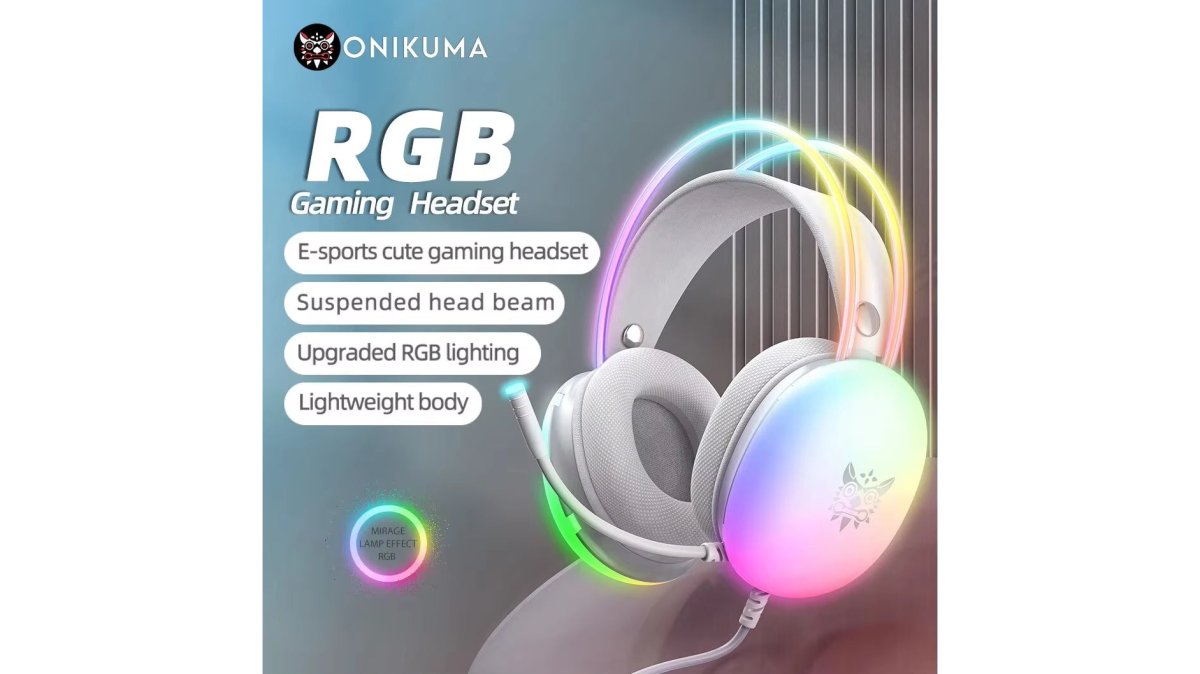
Gaming Headset Esports Package With RGB and Mic
The headset uses a suspended head beam and skin-friendly memory foam earmuffs, with 3D stereo sound and a 360 omnidirectional noise-canceling microphone. Volume control sits on the headset, so you never leave the game to adjust audio.
2.4G Wireless Mouse With RGB Backlit and 3-Speed DPI
At $12.94, this honeycomb mouse is the budget entry point. It runs 2.4G wireless with a USB receiver stored in the base, plug-and-play across Windows, Mac, Linux, and Chrome. DPI switches between 800, 1200, and 1600, and the RGB reacts to game audio.
2TB Rocket 4 Plus NVMe SSD With Heatsink Combo
Load times are a peripheral problem too. This $699.32 SSD hits 7,000MB/s read and 6,600MB/s write, well above the 5,500MB/s floor modern consoles require. The included CNC aluminum heatsink replaces the console's native cover for better cooling.
Gaming Peripheral Maintenance Tips for Long-Term Performance
Regular cleaning extends peripheral life more than any upgrade. Dust is the leading cause of switch failure and sensor drift.
- Wipe mouse feet and pad weekly to preserve glide
- Clean keyboard keycaps monthly; debris under switches causes chatter
- Replace worn mouse feet before they scratch your pad surface
- Keep firmware updated, but check release notes before flashing
- Store headsets on a stand to protect the cable joint
The Software Problem: Bloatware and Customization
Proprietary peripheral software is the most common complaint among serious gamers. Many vendor applications, including Asus Armoury Crate, Corsair iCue, and Razer Synapse, are criticized for being resource-heavy and difficult to manage, according to Tom's Hardware coverage of peripheral software.
Frequently Asked Questions
What are the essential gaming peripherals for competitive PC gaming?
A high-polling-rate mouse with a reliable optical sensor, a mechanical keyboard with low actuation force, a headset with clear directional audio, and a mouse pad with consistent surface friction form the core. Storage also matters: a Gen4 NVMe SSD like the 2TB Rocket 4 Plus reduces load times.
How do high-polling-rate mice improve gaming performance?
A higher polling rate means the mouse reports its position to your PC more frequently, reducing input lag and making cursor movement feel smoother. For serious gamers, this translates to more consistent tracking during fast flicks and micro-adjustments. The 2.4G Wireless Mouse at TechyDealy offers 800/1200/1600 DPI settings with plug-and-play USB receiver connectivity, so you can adjust sensitivity on the fly without driver installation.
What should serious gamers look for in a mechanical keyboard?
Focus on switch type, actuation force, and build quality. Linear switches suit fast-paced shooters because they have no tactile bump, while tactile or clicky switches help with typing feedback. Look for a switch lifespan rated in millions of presses and on-board memory for profile management. The best mechanical gaming keyboards 2026 prioritize low latency and durable keycaps over RGB lighting alone.
Are wireless gaming peripherals as reliable as wired options?
Modern 2.4G wireless connections have closed most of the latency gap. A wireless mouse like the 2.4G model at TechyDealy uses a dedicated USB receiver for a stable connection, and its built-in rechargeable battery eliminates the need for constant battery swaps. Wired gear still has an edge in zero-interference environments, but for most serious gamers, 2.4G wireless is reliable enough for competitive play.
How do I choose the right gaming headset for competitive audio?
Prioritize directional audio and a clear microphone over surround sound gimmicks. A headset with 3D stereo sound and a 360 omnidirectional noise-canceling mic, like the Gaming Headset Esports Package at TechyDealy, lets you hear footsteps and callouts without distortion. Wired communication ensures zero lag, which matters more than wireless convenience when a split-second audio cue decides a round. Comfort for long sessions is also non-negotiable.
Serious gamers eventually hit the same wall: gear that looks right but fails under pressure. TechyDealy stocks peripherals built to survive that pressure, from the $30.89 esports headset package to the 7,000MB/s Rocket 4 Plus SSD, all backed by complimentary ground shipping and hassle-free returns with a full purchase price refund. Shop Smart Essentials at TechyDealy and build a setup that holds up past the first ranked season.