

Table of Contents
- What Makes an Ergonomic Office Chair Worth Buying
- Best Ergonomic Office Chairs for Back Pain Relief
- Key Ergonomic Features to Look For
- Ergonomic Chair Adjustment Guide: Customizing Your Seat
- Affordable Ergonomic Office Chairs Without Compromise
- Complementary Ergonomic Accessories for Your Workspace
- How to Choose the Right Ergonomic Office Chair for Your Body
- Conclusion
- Frequently Asked Questions
Last Updated: September 21, 2026
What Makes an Ergonomic Office Chair Worth Buying
An ergonomic office chair is an investment in your comfort and productivity during long working hours. The global ergonomic office chair market was valued at USD 15.27 billion in 2026 and is projected to reach USD 18.79 billion by 2030 (The Business Research Company ergonomic office chairs report), reflecting growing demand from remote workers and office professionals. At TechyDealy, we understand that buying an ergonomic office chair online requires knowing which features actually matter for your body and work style.
The right chair does more than feel comfortable, it prevents back pain, reduces neck strain, and keeps you productive through eight-hour workdays. Seating accounted for 27.6% of the office furniture market in 2024 (Office Chair Statistics 2026 report), showing how central seating is to workspace setup. The challenge isn't finding options; it's identifying which ergonomic office chair delivers real support without overspending.
Below, we'll walk you through the key features that separate mediocre chairs from ones that actually protect your spine, how to test chairs before buying, and which models work best for different body types and budgets. By the end, you'll know exactly what to look for when you buy an ergonomic office chair online.
Best Ergonomic Office Chairs for Back Pain Relief
Back pain relief starts with lumbar support, the lower spine's natural curve needs reinforcement during hours of sitting. The market is increasingly competitive in the $400-$600 price bracket, with multiple capable alternatives challenging premium flagships (Flexi-Chair 2026 reviewer consensus).
A quality lumbar support system addresses the most common complaint: lower back strain from unsupported sitting. Look for chairs with adjustable lumbar depth and height so the support matches your spine's exact shape. Pressure relief matters equally, mesh backs breathe better than solid upholstery during long sessions, reducing heat buildup that compounds discomfort.
The Modulemaster Laptop Stand ($45.35) complements an ergonomic chair by raising your screen to eye level, eliminating the forward head posture that strains your neck and upper back. Pair it with a supportive chair and you've addressed the two biggest pain points in remote work setups.

For back pain specifically, prioritize chairs with synchro-tilt mechanisms, these allow the seat and backrest to move together, maintaining spinal alignment as you recline.
Key Ergonomic Features to Look For
When evaluating an ergonomic office chair, focus on six core features that determine whether it will actually support your body or become an expensive mistake.
Adjustable lumbar support is non-negotiable. Your lower spine has a natural inward curve (lordosis) that flat-backed chairs ignore. The best chairs let you adjust both the depth and height of lumbar support so it contacts your spine exactly where you need it. Without this, you're relying on cushion density alone, which fails after a few months of compression.
Seat depth and width matter more than most people realize. A seat that's too deep pushes your knees forward, restricting blood flow to your legs. Too shallow, and your thighs lack support. Standard depth is 16-18 inches. Width should allow 2-3 fingers of space on each side of your hips when seated.
Pneumatic height adjustment should move smoothly across a 4-5 inch range.
Armrest adjustability prevents shoulder and neck tension. Fixed armrests force you into one position; adjustable ones let you raise, lower, and angle them to match your desk height and arm length. Your elbows should rest at a 90-degree angle when typing.
Tilt tension and synchro-tilt mechanisms control how the chair moves as you recline. Synchro-tilt keeps the seat and backrest moving together, maintaining spinal alignment. Tilt tension should be adjustable so you can lock the chair upright for focused work or allow gentle rocking for breaks.
Breathability through mesh or perforated materials matters during 8-hour workdays. Solid upholstery traps heat and sweat, leading to discomfort. Mesh backs circulate air, keeping you cooler and reducing the pressure points that cause pain.
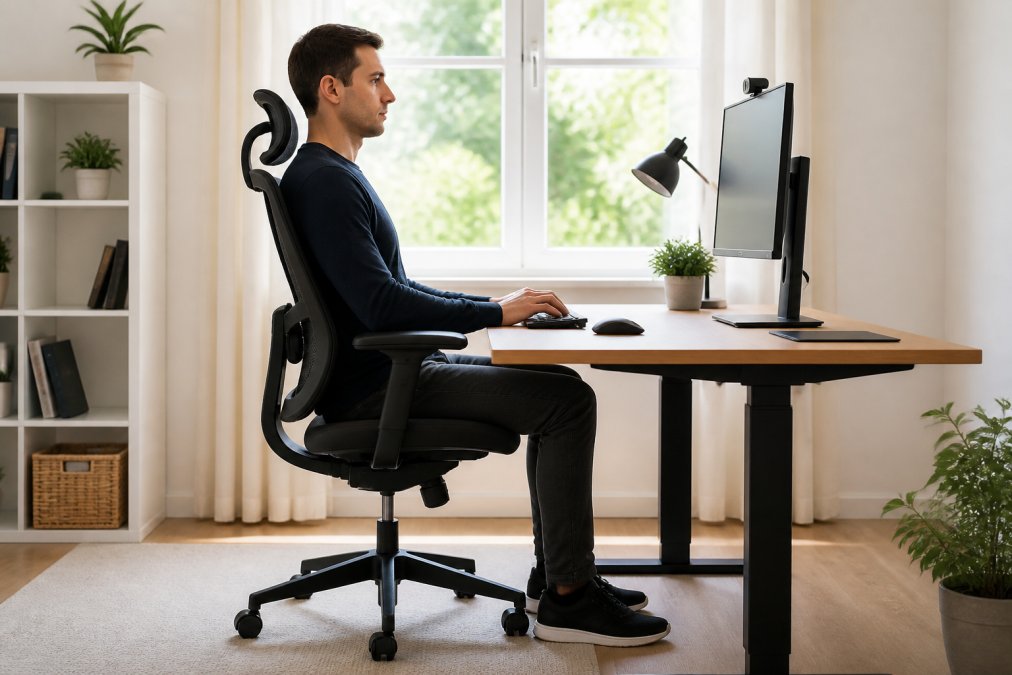
Ergonomic Chair Adjustment Guide: Customizing Your Seat
An ergonomic office chair only works if you adjust it correctly. Most people buy a quality chair, skip the setup, and wonder why it doesn't feel comfortable.
Start with seat height. Your feet should rest flat on the floor or footrest with knees at a 90-degree angle. If your feet dangle, raise the seat. If your knees point upward, lower it. This single adjustment prevents leg strain and improves circulation.
Next, set lumbar support. Sit back fully in the chair. The lumbar curve should contact your lower spine, not your mid-back or tailbone. Adjust depth forward or backward until it matches your spine's natural curve. Adjust height so the peak of the curve aligns with your lowest rib.
Position armrests at elbow height. When your arms rest on the armrests, your elbows should bend at 90 degrees. This prevents shoulder tension and reduces strain on your wrists during typing. If armrests are too high, your shoulders hunch; too low, and you lean sideways.
Set tilt tension to your preference. For focused work, lock the backrest upright. For breaks, loosen tension so you can recline gently without effort. Most people find a middle ground, slight give without free-floating movement.
Adjust the headrest if your chair has one. It should support the base of your skull, not the top of your head. This prevents forward head posture, which strains your neck and shoulders.
After adjusting, sit for 15 minutes and check for pressure points. Numb spots on your thighs, tingling in your legs, or neck tension mean something needs tweaking.
Affordable Ergonomic Office Chairs Without Compromise
You don't need to spend a premium on an ergonomic office chair to get real support. The mid-range now offers capable options that handle 8-hour workdays.
Mid-range chairs in this bracket typically include:
- Adjustable lumbar support with multiple depth positions
- Mesh backs for breathability
- Pneumatic height adjustment with reliable cylinders
- Adjustable armrests
- Synchro-tilt mechanisms
- 5-year warranties covering structural defects
The trade-off versus premium models is usually in materials and aesthetics. But the core support system, lumbar, seat depth, tilt mechanism, can be comparable to what you'd find in higher-priced chairs.
TechyDealy's commitment to hassle-free returns means you can test an affordable ergonomic office chair risk-free. If it doesn't work for your body after 30 days, return it for a full refund with complimentary ground shipping both ways.
| Feature | Budget ($300-$400) | Mid-Range ($400-$600) | Premium ($800+) |
|---|---|---|---|
| Adjustable lumbar support | Basic (1-2 positions) | Advanced (3-5 positions) | Premium (continuous adjustment) |
| Seat depth options | Fixed | Adjustable | Adjustable |
| Mesh quality | Standard | High-grade | Premium grade |
| Warranty | 2-3 years | 5 years | 10+ years |
| Weight capacity | 250 lbs | 300 lbs | 350+ lbs |
Complementary Ergonomic Accessories for Your Workspace
An ergonomic office chair works best as part of a complete setup. Accessories fill gaps that chairs alone can't address.
Laptop stands eliminate downward head tilt.
How to Choose the Right Ergonomic Office Chair for Your Body
Body type matters more than brand reputation when selecting an ergonomic office chair. A chair that works perfectly for a 5'4" person may fail for someone 6'2".
Conclusion
Buying an ergonomic office chair online requires understanding which features actually prevent pain and which are marketing hype. Focus on adjustable lumbar support, seat depth that matches your body, and breathable materials. Test the chair for at least 30 minutes before committing, and pair it with complementary accessories like a laptop stand and ergonomic mouse.
Frequently Asked Questions
What features should I look for in an ergonomic office chair?
Look for adjustable lumbar support that conforms to your spine's natural curve, adjustable armrests to prevent shoulder strain, seat depth between 16-18 inches, breathable mesh or fabric backing, and a pneumatic height adjustment mechanism. The chair should also have a stable base with smooth-rolling casters, a weight capacity that exceeds your body weight, and tilt tension control. These features work together to reduce pressure on your joints and promote proper spinal alignment during long working hours.
How do I choose the right ergonomic chair for my height and weight?
Measure your height and check the manufacturer's recommended height range. Verify the weight capacity exceeds your body weight for safety. Seat depth matters: your back should rest against the backrest with space between the seat pan edge and the back of your knees. Armrest height should allow your elbows to rest at 90 degrees when sitting. Test the chair's adjustability range to ensure you can customize it to your proportions.
What is the best ergonomic office chair for back pain relief?
The best chair for back pain includes adjustable lumbar support that targets your lower spine, a high-density cushion that distributes weight evenly, and a synchro-tilt mechanism that allows your spine to move naturally. Proper seat depth and height adjustment are critical, your feet should rest flat on the floor with knees at 90 degrees.
Are affordable ergonomic office chairs actually effective for long work sessions?
Yes, affordable ergonomic chairs can provide genuine support for extended work sessions if they include essential features: adjustable lumbar support, breathable backing, height adjustment, and a stable base. Many options now match higher-end chairs on adjustability and support. Focus on chairs with proven lumbar support and positive user feedback rather than brand name alone.
Build your ideal home office setup with TechyDealy's curated ergonomic solutions. Start with a supportive chair, add the Modulemaster Laptop Stand for proper screen height, and equip your workspace with an ergonomic mouse and organized desk accessories. Shop Smart Essentials today and enjoy complimentary ground shipping on every order, plus full-refund returns within 30 days if anything doesn't fit your needs.