

Table of Contents
- What Makes a High Performance Gaming Mouse Stand Out
- Gaming Mouse Polling Rate Explained: Why It Matters for Competitive Play
- How to Choose a Gaming Mouse Sensor for Your Play Style
- Best Wireless Gaming Mouse 2026: Performance Without the Cable
- Wired vs. Wireless: Latency, Battery Life, and Real-World Performance
- Ergonomics and Grip Styles: Finding Your Fit
- Programmable Buttons and Software: Customization Without Bloat
- Durability and Maintenance: What to Expect Long-Term
Last Updated: August 27, 2026
What Makes a High Performance Gaming Mouse Stand Out
A high performance gaming mouse combines precision sensor technology, low-latency connectivity, and ergonomic design to deliver the responsiveness competitive gamers need. Unlike standard office mice, gaming-grade peripherals prioritize millisecond-level accuracy and customizable controls for specific games and playstyles.

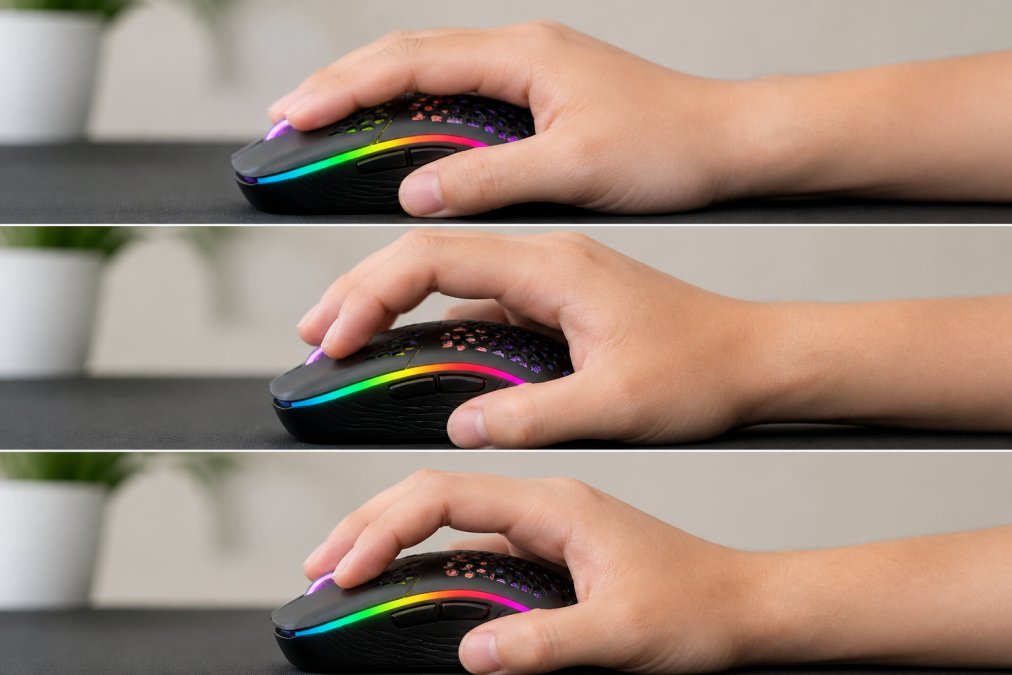
The PC gaming mouse market is projected to reach $3.24 billion in 2026, growing at a compound annual growth rate of 17% from $2.77 billion in 2025, according to The Business Research Company's PC Gaming Mouse Market Report. This growth reflects rising demand for ultra-low latency input devices and increasing esports popularity.
At TechyDealy, we've curated gaming mice that balance performance with value. Key differentiators include sensor type, polling rate, weight, and build quality. These specifications directly impact your in-game performance.
Research from the Center for Occupational and Environmental Health at Berkeley showed that participants were 4% faster and 9% more accurate with 50g, 60g, and 90g mice compared to heavier 100g models (coeh.berkeley.edu). The 60g mouse specifically received the highest overall preference score, balancing performance with minimized discomfort during extended sessions.
Gaming Mouse Polling Rate Explained: Why It Matters for Competitive Play
Your gaming mouse's polling rate is how many times per second it reports its position to your computer, measured in hertz (Hz). A 1000 Hz polling rate means the mouse communicates its location 1000 times every second. Higher polling rates reduce input lag, the delay between your physical movement and what appears on screen.
For competitive shooters and fast-paced games, polling rate directly affects your ability to track targets and react. Professional esports players typically use 8000 Hz polling rate mice, which cuts input lag to just 0.125 milliseconds. Standard gaming mice operate at 1000 Hz (1 millisecond delay), while budget options may use 125 Hz (8 milliseconds).
At 1000 Hz, you receive position updates every millisecond. At 125 Hz, you wait 8 milliseconds between updates, enough time for an opponent's crosshair to shift in a fast-moving duel. Razer's Viper V3 Pro uses 8000 Hz HyperPolling Wireless technology and became the #1 most-used peripheral in professional gaming across every FPS in ProSettings' database within six months of its launch.
However, higher polling rates demand more from your system. An 8000 Hz mouse generates more data traffic and requires a more powerful processor to handle the input stream. For casual gaming or strategy games, the jump from 1000 Hz to 8000 Hz produces negligible real-world difference.
How to Choose a Gaming Mouse Sensor for Your Play Style
The sensor is the heart of any high performance gaming mouse. It tracks your physical movement and translates it into on-screen cursor motion. Two sensor types dominate: optical and laser.
Optical vs. Laser Sensors
Optical sensors use LED light and a camera to track movement on a surface. They work best on standard hard mousepads and cloth surfaces, offering lower latency and better prediction algorithms. Optical sensors are generally more reliable and preferred for competitive gaming.
Laser sensors use a laser beam instead of LED light, penetrating deeper into the mousepad surface. This gives superior tracking on glossy, reflective, or uneven surfaces and can achieve higher maximum DPI settings. The trade-off is that laser sensors are more prone to acceleration and prediction errors on certain surfaces.
For most gamers, optical sensors deliver more predictable performance. Laser sensors excel when playing on unusual surfaces or needing the absolute highest DPI ceiling.
DPI and Acceleration Settings
DPI (dots per inch) measures how far your cursor moves for a given physical mouse movement. A 400 DPI setting means the cursor moves 400 pixels for every inch your mouse travels.
Competitive players typically use 400-800 DPI, balancing precision with reasonable hand movement across the mousepad. Professional esports players rarely exceed 1600 DPI. Most gamers benefit from lower DPI paired with a larger mousepad that allows full arm movement.
Acceleration is a setting that increases cursor speed based on how quickly you move your mouse. For competitive play, disable acceleration entirely. It introduces unpredictability: the same physical movement produces different cursor distances depending on speed, making muscle memory training nearly impossible.
Best Wireless Gaming Mouse 2026: Performance Without the Cable
Wireless technology now dominates the gaming peripherals market, accounting for 58.8% of the United States gaming peripherals market in 2025. Modern 2.4 GHz wireless protocols deliver latency indistinguishable from wired mice while offering freedom of movement and cleaner desk aesthetics.
The Razer Viper V3 Pro stands out as a top wireless gaming mouse available. It combines a 54g ultra-lightweight chassis, a 35,000 DPI optical sensor, and 8000 Hz HyperPolling Wireless technology with exceptional battery life, you can game for days on a single charge.
TechyDealy carries the 2.4G Wireless Mouse with RGB Backlit 6-Button 3-Speed DPI Type C Rechargeable Ergonomic Honeycomb Design Gaming Mouse at $12.94, offering wireless gaming at an entry-level price point. This mouse features a honeycomb shell design for weight reduction, 6 programmable buttons, and three DPI settings (800, 1200, 1600).
For mid-range wireless mice, the Logitech G PRO X2 SUPERSTRIKE delivers Rapid Trigger technology and haptic inductive triggers with 80-hour battery life.
The high-price segment (mice above $100) is a fast-growing tier, reflecting demand from esports professionals and serious competitive players.
Wired vs. Wireless: Latency, Battery Life, and Real-World Performance
Modern wireless gaming mice using 2.4 GHz protocols deliver 1-millisecond latency, matching or beating wired mice. The practical difference is now negligible for competitive play.
Wired mice eliminate battery concerns entirely and tend to be cheaper. The cable does introduce slight drag, though modern paracord cables minimize this effect.
Wireless mice offer freedom of movement and cleaner desk setup. Modern wireless gaming mice hold a charge for 50-100 hours depending on polling rate and RGB lighting usage. If you're gaming 20 hours per week, you'll charge your mouse roughly every 2-3 weeks.
Professional esports players still favor wired mice in tournament settings, primarily for consistency and eliminating potential interference risk. In practice, wireless interference is rare in modern gaming environments.
For home use, wireless now represents a strong choice. The latency gap has closed, and wireless technology offers superior ergonomics through reduced cable drag.
Ergonomics and Grip Styles: Finding Your Fit
Hand size and grip style determine whether a mouse feels natural or causes strain during long sessions. A poorly matched mouse creates muscle tension, reduces precision, and can lead to repetitive strain injury.
Palm, Claw, and Fingertip Grips
Palm grip means your entire hand rests on the mouse, with your palm contacting the back and your fingers curled around the sides. This grip distributes pressure evenly and is most comfortable for extended sessions. Palm grip users need larger mice (around 125mm length) with pronounced curves.
Claw grip positions your palm above the mouse with only your fingertips and heel of your hand touching the surface. Your fingers arch like a claw, providing maximum control and quick movement. Claw grip demands smaller, more angular mice (around 110-115mm) and is popular among esports players.
Fingertip grip uses only your fingertips to control the mouse, with your palm floating above the surface. This grip maximizes mobility but requires the smallest, lightest mice available (under 70 grams).
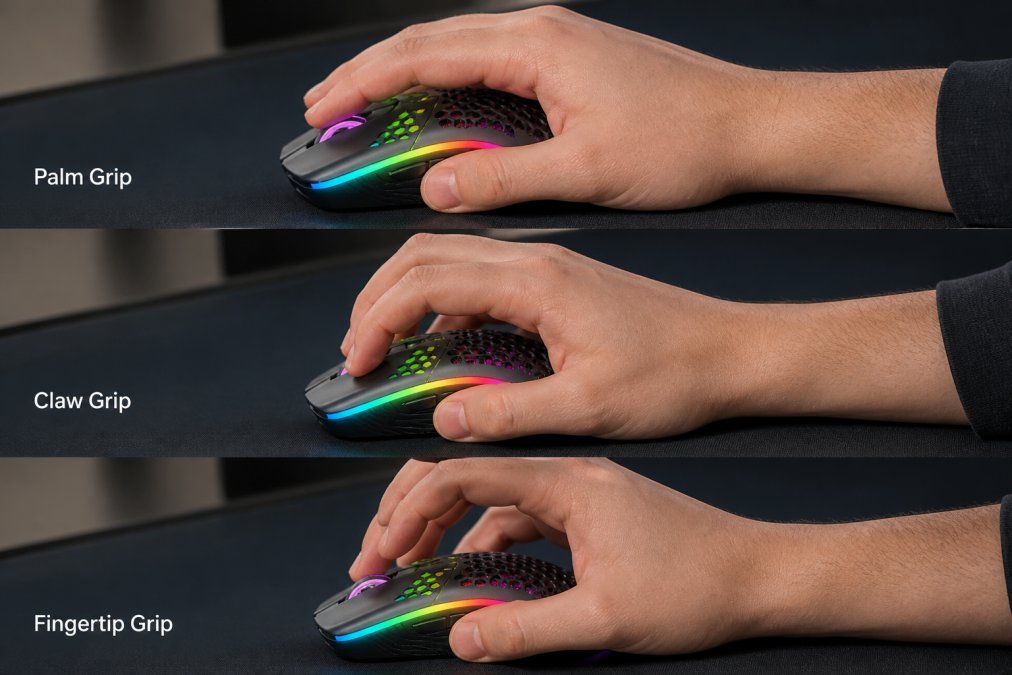
Your grip style directly influences which mouse feels right. A palm-grip player will find a fingertip-oriented mouse too small and twitchy.
Weight Reduction and Long-Term Comfort
Lighter mice (50-70g) reduce muscular effort needed to move your hand across the mousepad, decreasing fatigue over extended sessions. The 60g mouse achieves the highest overall preference score, balancing responsiveness with stability.
Long-term comfort also depends on cable design and surface texture. Paracord cables are braided, lightweight, and minimize drag. PTFE feet (Teflon-coated plastic pads) reduce friction against the mousepad. Ergonomic side grips and textured surfaces prevent slipping during intense play.
Programmable Buttons and Software: Customization Without Bloat
High-performance gaming mice typically feature 6-12 programmable buttons positioned on the side or thumb area. These buttons let you assign game-specific actions without moving your hand to the keyboard.
The best gaming mouse software lets you create profiles per game, assign buttons, adjust DPI, and configure polling rate. Onboard memory is ideal: the mouse stores your settings internally, so you don't need software running constantly.
TechyDealy's 2.4G Wireless Mouse includes 6 programmable buttons and supports three DPI settings that you can switch on the fly. Professional gamers often disable RGB lighting to reduce power consumption and minimize visual distraction.
Durability and Maintenance: What to Expect Long-Term
Gaming mice experience heavy use. Most gaming mice use either mechanical switches (rated for 50-100 million clicks) or optical switches (typically reaching 100-200 million clicks).
Cable durability matters for wired mice. Paracord cables last significantly longer than standard rubber cables. The cable's connection point to the mouse is a common failure point, look for reinforced connectors.
Maintenance extends mouse lifespan. PTFE feet wear down over time and can be replaced with adhesive-backed replacements ($5-15 per set). Clean the mouse bottom and sensor area monthly to prevent dust buildup that degrades tracking accuracy.
The high-price gaming mouse segment is growing, suggesting gamers increasingly value durability and long-term reliability. Most gaming mice carry 1-2 year warranties covering defects. TechyDealy's hassle-free return policy means if your mouse fails within the return window, you get a full refund.
| Durability Factor | Standard Mice | Premium Mice | Impact on Longevity |
|---|---|---|---|
| Switch Rating | 50M clicks | 100M+ clicks | Determines button lifespan |
| Cable Type | Rubber | Paracord | Reduces wear and tear |
| Build Materials | Plastic | Reinforced polymer | Increases structural durability |
| Warranty | 1 year | 2 years | Covers manufacturing defects |
| Replacement Parts | Limited | Widely available | Extends usable lifespan |
Choosing a high performance gaming mouse comes down to matching your grip style, gaming genre, and budget to the right specifications. Polling rate, sensor type, and weight matter most for competitive play. Ergonomics and build quality determine whether your mouse stays comfortable and functional for years.
When you're ready to buy high performance gaming mouse online, TechyDealy offers competitive pricing with complimentary ground shipping and hassle-free returns on every order. Our curated selection includes entry-level wireless gaming mice starting at $12.94, mid-range options with advanced features, and premium peripherals for esports professionals. Shop with confidence knowing that if your gaming mouse doesn't meet your expectations, our return policy gives you full flexibility to find the right fit for your setup.
=== FAQ ANSWERS (audit these too, same rules) ===
[1] Q: What polling rate do I actually need in a high performance gaming mouse? A: For competitive FPS gaming, 1000 Hz (1ms response time) is the industry standard and sufficient for most players. Higher rates like 4000 Hz or 8000 Hz offer marginally faster input registration but require specific games and hardware to benefit. Studies show that 50g to 60g mice with standard polling rates outperform heavier mice in accuracy and speed. Unless you're competing professionally, 1000 Hz delivers the performance you need without unnecessary cost.
[2] Q: How do I choose between optical and laser sensors in a gaming mouse? A: Optical sensors work best on standard mouse pads and offer excellent tracking precision with minimal lift-off distance. Laser sensors penetrate glossy surfaces and work on various materials but can produce slight acceleration artifacts. For most gamers, optical sensors provide more consistent performance. Check your mousepad surface and play style: optical sensors suit standard pads and competitive play, while laser sensors work better if you game on glass or reflective desks.
[3] Q: Are wireless gaming mice really as responsive as wired ones in 2026? A: Yes. Wireless technology now delivers latency comparable to wired mice, with top models like the Razer Viper V3 Pro achieving 8000 Hz polling rates wirelessly. The wireless gaming mouse segment holds a significant market share, reflecting widespread confidence in the technology. Battery life has improved significantly, with many models lasting 50+ hours per charge. The only real advantage wired mice retain is eliminating battery concerns, but modern wireless options eliminate the latency disadvantage that existed years ago.
[4] Q: What should I look for in a high performance gaming mouse to avoid durability issues? A: Prioritize PTFE feet (also called Teflon feet) for smooth, consistent gliding without degradation. Check for mechanical or optical switches rated for 50+ million clicks. Honeycomb shell designs reduce weight while maintaining structural integrity. Verify the mouse includes onboard memory so custom settings persist without software running. Read reviews specifically about long-term use after 6-12 months. Avoid mice requiring constant software updates for basic functionality, as software bloat can cause reliability issues over time.
Frequently Asked Questions
What polling rate do I actually need in a high performance gaming mouse?
For competitive FPS gaming, 1000 Hz (1ms response time) is the industry standard and sufficient for most players. Higher rates like 4000 Hz or 8000 Hz offer marginally faster input registration but require specific games and hardware to benefit. Studies show that 50g to 60g mice with standard polling rates outperform heavier mice in accuracy and speed. Unless you're competing professionally, 1000 Hz delivers the performance you need without unnecessary cost.
How do I choose between optical and laser sensors in a gaming mouse?
Optical sensors work best on standard mouse pads and offer excellent tracking precision with minimal lift-off distance. Laser sensors penetrate glossy surfaces and work on various materials but can produce slight acceleration artifacts. For most gamers, optical sensors provide more consistent performance. Check your mousepad surface and play style: optical sensors suit standard pads and competitive play, while laser sensors work better if you game on glass or reflective desks.
Are wireless gaming mice really as responsive as wired ones in 2026?
Yes. Wireless technology now delivers latency comparable to wired mice, with top models like the Razer Viper V3 Pro achieving 8000 Hz polling rates wirelessly. The wireless gaming mouse segment holds a significant market share, reflecting widespread confidence in the technology. Battery life has improved significantly, with many models lasting 50+ hours per charge. The only real advantage wired mice retain is eliminating battery concerns, but modern wireless options eliminate the latency disadvantage that existed years ago.
What should I look for in a high performance gaming mouse to avoid durability issues?
Prioritize PTFE feet (also called Teflon feet) for smooth, consistent gliding without degradation. Check for mechanical or optical switches rated for 50+ million clicks. Honeycomb shell designs reduce weight while maintaining structural integrity. Verify the mouse includes onboard memory so custom settings persist without software running. Read reviews specifically about long-term use after 6-12 months. Avoid mice requiring constant software updates for basic functionality, as software bloat can cause reliability issues over time.
This article was written using GrandRanker