

Table of Contents
- What Makes Durable Gaming Peripherals Stand Out
- Best Mechanical Switches for Longevity and Performance
- Gaming Mouse Click Lifespan Ratings: What the Numbers Mean
- Build Quality and Materials That Withstand Heavy Use
- How to Clean Gaming Peripherals and Prevent Wear
- Repairability and Hot-Swappable Components
- Our Top Durable Gaming Peripherals Pick
- Frequently Asked Questions
Last Updated: September 1, 2026
What Makes Durable Gaming Peripherals Stand Out
Durable gaming peripherals are built to survive years of intense use without degrading. The difference between a peripheral that lasts 6 months and one that lasts 5 years comes down to three core factors: component quality, engineering tolerance, and repairability.
The global gaming peripheral market was valued at USD 7.01 billion in 2025 and is projected to grow to USD 7.79 billion in 2026 (Fortune Business Insights Gaming Peripherals Market Report), driven largely by demand for peripherals that survive competitive gaming and extended play sessions. According to Coherent Market Insights PC Gaming Peripheral Analysis, mechanical switch keyboards with durability beyond 70 million keystrokes dominate professional setups across more than 72% of tournament environments.
A high-quality gaming mouse can last anywhere from 2 to 5 years depending on usage patterns and maintenance (Attack Shark Gaming Mouse Durability Guide). The rated click lifespan of mouse buttons typically ranges between 20 million to 50 million clicks, enough for years of competitive play if the switches are engineered correctly.
Best Mechanical Switches for Longevity and Performance
Mechanical switches are the foundation of durability in gaming keyboards. A quality mechanical switch can withstand 50+ million keystrokes. A cheap membrane switch fails in months.
Mechanical vs. Membrane: Which Actually Lasts Longer
Mechanical switches use physical springs and metal contacts. Membrane switches use rubber domes and conductive layers. Mechanical switches are rated for 20-100 million keystrokes depending on the manufacturer and switch type. Membrane switches typically fail around 5-10 million keystrokes, the difference between a keyboard lasting 5 years and one failing in 8 months.
The reason: mechanical switches have fewer moving parts and those parts are metal-on-metal contact. Membrane switches rely on rubber degradation, which doesn't age well.
Not all mechanical switches are created equal. Cherry MX switches, the industry standard, offer consistency across millions of units. Cheaper mechanical clones sometimes cut corners on spring tension or contact plating, reducing lifespan significantly. Stick with established switch manufacturers like Cherry, Gateron, or Razer's optical switches.
Approximately 58% of gaming peripheral purchases are influenced by esports participation and online multiplayer gaming, which means durability directly impacts performance. A keyboard with degraded switches introduces inconsistent actuation, a competitive liability.
Switch Lifespan Ratings and Durability Benchmarks
Switch durability is measured in actuation cycles:
| Switch Type | Rated Lifespan | Real-World Duration | Best For |
|---|---|---|---|
| Cherry MX Mechanical | 50M keystrokes | 3-5 years (daily use) | Competitive gaming, streaming |
| Gateron Mechanical | 50-80M keystrokes | 4-6 years (daily use) | Budget-conscious durability seekers |
| Razer Optical | 80M+ keystrokes | 5-7 years (daily use) | High-speed FPS titles |
| Membrane | 5-10M keystrokes | 6-12 months (heavy use) | Not recommended for gaming |
| Hot-swappable Mechanical | 50M+ per switch | Indefinite (switches replaceable) | Long-term investment |
Hot-swappable keyboards win the longevity game because individual switches can be replaced. A $120 keyboard with $0.50 replacement switches outlasts a $80 non-replaceable keyboard every time.
Gaming Mouse Click Lifespan Ratings: What the Numbers Mean
A gaming mouse lives and dies by its click switches. The rated lifespan of mouse buttons typically falls between 20 million to 50 million clicks. If you click 2,000 times per day (conservative for competitive gamers), a 20 million click rating lasts about 27 years. But real-world failure happens faster because rapid-fire clicking, double-clicks, and side-button mashing stress switches unevenly.
Most gaming mice fail around the 2-3 year mark due to switch contact degradation, spring fatigue, and double-click failures, the most common failure mode where a single click registers as two.
Optical switches use light beams to detect clicks instead of physical contact. No contact means no wear. Razer's Huntsman series and newer optical designs push lifespan claims to 70+ million clicks because they eliminate the wear mechanism entirely.
Sensor Precision Over Time and Component Degradation
Mouse sensors degrade through mechanical wear and firmware drift. The sensor lens collects dust and oils from your hand, reducing tracking precision over time. Older mice receive no driver updates, while newer mice from reputable manufacturers like Logitech and Corsair receive multi-year driver support, which patches sensor calibration issues and improves compatibility.
Component-level durability depends on sensor type (optical sensors like PMW3389 are more durable than older laser sensors), cable strain relief, PTFE feet quality, and PCB design for heat management.
The TechyDealy 2.4G Wireless Mouse with RGB Backlit 6-Button 3-Speed DPI ($12.94) uses a standard optical sensor with adjustable DPI settings (800/1200/1600), allowing you to reduce sensor strain by using lower DPI for less-demanding tasks. The ergonomic honeycomb design reduces hand fatigue during extended sessions, which indirectly improves durability by reducing stress-induced wear.

Build Quality and Materials That Withstand Heavy Use
Material selection separates peripherals that last from ones that don't. High-quality peripherals use reinforced plastics, aluminum frames, and stainless steel springs. Cheap peripherals use thin ABS plastic that cracks under pressure, allowing dust and moisture inside and accelerating internal component failure.
PBT keycaps are the gold standard for keyboard durability. They resist shine, don't absorb oils, and maintain texture for years. ABS keycaps absorb hand oils and develop a slick surface within months. The best mechanical keyboards use double-shot PBT keycaps where the legend is molded in, not printed on, so it never wears off.
For mice, the chassis material matters less than the internal structure. A reinforced PCB with proper shielding prevents electromagnetic interference from degrading the sensor. What matters: how the cable is routed, whether the switches are soldered or socketed, and if the sensor has proper isolation.
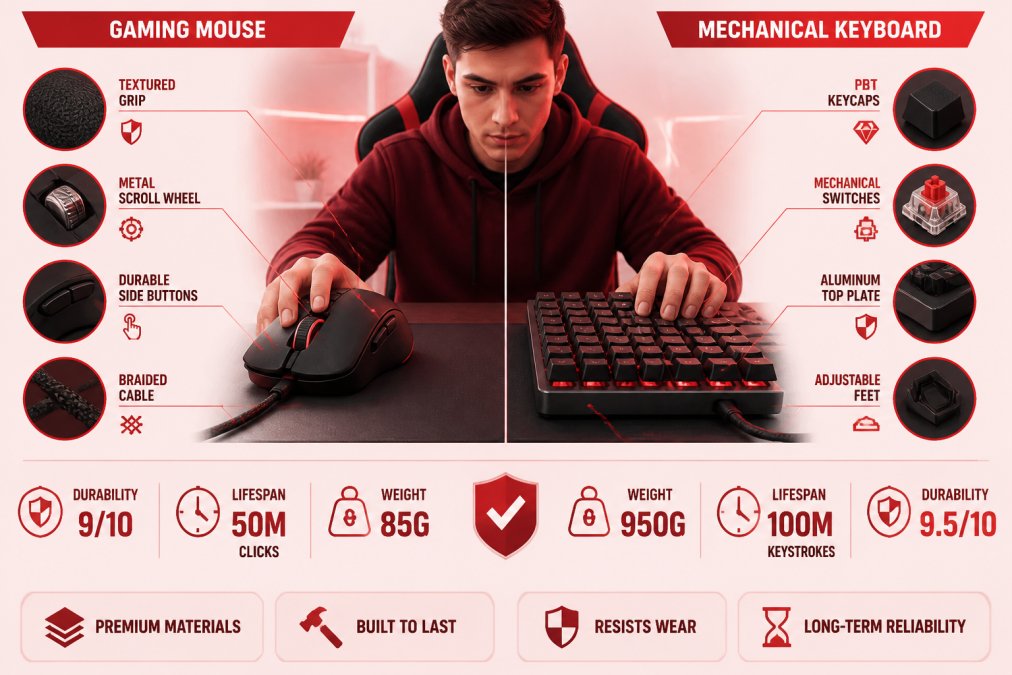
Corsair and Razer invest in industrial-grade materials because their target market, esports professionals, replaces gear only when it fails. Budget brands cut corners on internal components to hit price points, which is why they fail faster.

Wired vs. Wireless Connectivity: Long-Term Reliability
Wired peripherals last longer than wireless ones. A wired connection is passive, no battery, no wireless module, no firmware updates required. Wireless introduces complexity: batteries degrade, wireless modules can fail, and firmware updates sometimes introduce compatibility issues.
The wired segment accounts for around 64.5% of the global gaming peripheral market in 2026. Professional esports players still prefer wired peripherals for competitive titles where 1ms of latency matters.
Wireless gaming peripherals have improved dramatically, but wireless introduces a new failure mode: battery degradation. Over 3 years, batteries lose capacity, making wireless peripherals less reliable after 2-3 years. For a peripheral you'll keep for 5+ years, wired is the safer bet. For a peripheral you'll upgrade in 2-3 years, wireless is fine.
Cable strain relief is critical for wired peripherals. A reinforced connector prevents internal wire breaks from repeated flexing. Quality cables use Kevlar reinforcement and strain relief boots that survive thousands of bend cycles.
How to Clean Gaming Peripherals and Prevent Wear
Maintenance extends peripheral lifespan by 1-2 years. Dust and oils are the primary killers.
A gaming mouse accumulates dust inside the sensor chamber and on the PTFE feet, causing tracking jitter and increased friction. A keyboard collects dust between the keys and inside the switch housing, reducing responsiveness and accelerating mechanical wear.
Clean your mouse every 2-4 weeks if you use it daily. Use a microfiber cloth for the exterior and a small brush or compressed air for the sensor. Never use liquid cleaners on the sensor lens. For the feet, a gentle rubbing with a microfiber cloth removes oils and restores glide.
Keyboards need more attention. Use a keycap puller to remove caps and clean underneath with a small brush. For mechanical keyboards, you can soak keycaps in warm water with mild soap, then dry completely before reinstalling. Never submerge the keyboard itself.
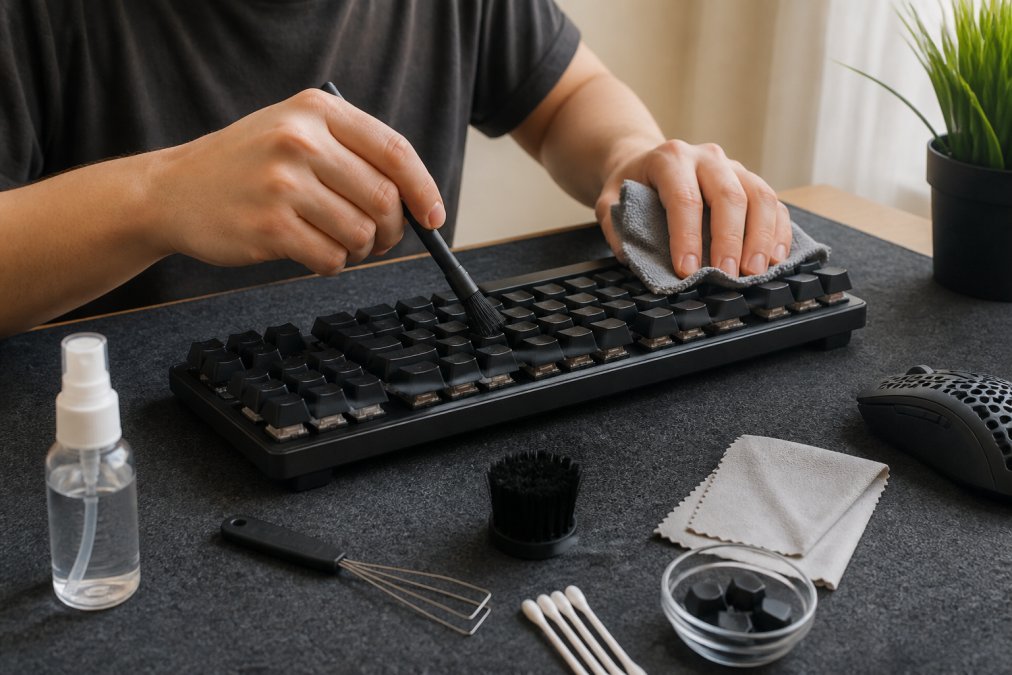
Cable Strain Relief and Maintenance Essentials
Cable damage is the second-most common failure mode after switch wear. Protect your cable by routing it away from sharp edges, using a cable organizer, avoiding tight coils, and checking the connector regularly.
The strain relief boot, where the cable meets the connector, is where most cables fail. A quality strain relief boot is thick rubber or plastic that flexes without kinking. Cheap strain relief cracks and splits, exposing internal wires.
For wireless peripherals, the USB charging port is the wear point. Use a gentle hand when charging and avoid yanking the cable. Some premium wireless mice use magnetic charging connectors instead of USB ports, which eliminates this wear point entirely.
Software Support and Firmware Updates for Longevity
Firmware updates extend peripheral lifespan by improving compatibility and fixing bugs. Logitech provides driver updates for peripherals 5+ years old. Corsair does the same. Budget brands often provide zero driver support, meaning your peripheral works only on the OS it shipped with.
Check the manufacturer's driver page before buying. If they don't list your region or OS, driver support is uncertain. Stick with manufacturers that commit to multi-year support.
Repairability and Hot-Swappable Components
The most durable gaming peripheral is one you can repair instead of replace.
Hot-swappable keyboards are the gold standard. Individual switches can be removed and replaced without soldering. A keyboard with hot-swappable switches can last 10+ years because you replace worn switches, not the entire keyboard. Replacement switches cost $0.50-$2 each versus $80-$200 for a new keyboard.
For keyboards, look for the "hot-swap" specification explicitly. The best hot-swap keyboards use standard MX-compatible switches, meaning you can buy replacement switches from any manufacturer.
Repairability extends beyond switches. A keyboard with a replaceable stabilizer bar or spacebar stabilizer lasts longer than one where these components are glued in. A mouse with a replaceable cable connector lasts longer than one where the cable is soldered to the PCB.
Our Top Durable Gaming Peripherals Pick
After analyzing durability metrics, material quality, and long-term component reliability, the TechyDealy 2.4G Wireless Mouse with RGB Backlit 6-Button 3-Speed DPI Type C Rechargeable Ergonomic Honeycomb Design ($12.94) stands out for value and practical durability.
This mouse prioritizes ergonomic design with a honeycomb structure that reduces hand fatigue during extended sessions. The 3-speed DPI adjustment (800/1200/1600) lets you optimize for different games, reducing sensor strain. The Type-C rechargeable battery eliminates disposable batteries, a sustainability win and durability advantage with fewer components to fail.
For a gaming setup, pair this with the TechyDealy Gaming Headset Esports Package ($30.89), which includes wired communication for stable connectivity and memory foam earmuffs for extended comfort.

If you're building a complete durable setup, the TechyDealy Portable Foldable Folding Keyboard Mini Wireless Bluetooth ($30.21) offers mechanical-switch-level durability in a compact form. With 81 keys and a 140mAh battery supporting 35 hours of uninterrupted use, this keyboard balances portability with longevity.
The peripheral market is shifting toward durability. Gamers are tired of replacing gear every few months, and manufacturers are responding with better materials, repairability, and long-term software support. The best durable gaming peripherals aren't always the most expensive, they're engineered for repair and built with components rated for millions of cycles.
When shopping for gaming peripherals, skip the marketing hype about RGB and angular designs. Focus on switch ratings, material quality, and whether the manufacturer commits to driver support. At TechyDealy, we stock peripherals that survive competitive gaming and extended play sessions. Shop with confidence, knowing every item ships free and comes with a hassle-free return policy if durability doesn't meet your expectations.
Frequently Asked Questions
How long do durable gaming peripherals typically last?
High-quality gaming peripherals can last 2 to 5 years with regular use, though some components degrade faster. Gaming mice with rated click lifespans of 20 to 50 million clicks can endure years of intensive play. Mechanical keyboards rated for 70+ million keystrokes dominate professional tournaments. Lifespan depends on usage intensity, maintenance, and component quality. Wireless devices may experience battery degradation sooner than wired alternatives, but modern lithium batteries hold up well with proper charging habits.
What gaming mouse click lifespan ratings should I look for?
Look for gaming mice with click durability ratings between 20 to 50 million clicks. This benchmark, common among quality manufacturers, translates to several years of heavy gaming. Higher-end models often exceed 50 million clicks. Check the manufacturer's specifications and look for optical or mechanical switch types, both offer reliable longevity. Reputable brands test and publish these ratings, so verify the numbers before purchasing. A mouse rated for 20 million clicks will outlast budget alternatives by years.
Are mechanical switches really more durable than membrane switches?
Yes, mechanical switches significantly outlast membrane switches. Mechanical keyboards rated for 70+ million keystrokes dominate professional gaming and esports environments, while membrane keyboards typically fail after 5 to 10 million presses. Mechanical switches use individual springs and stems that tolerate repetitive actuation far better than rubber domes. They also remain tactile and responsive longer. If durability is your priority, mechanical keyboards are the proven choice. The tactile feedback also improves long-session comfort, reducing hand fatigue.
How do I extend the lifespan of my gaming peripherals?
Clean your peripherals regularly with a soft brush and microfiber cloth to prevent dust and debris buildup. Avoid eating or drinking near your setup to prevent spills. Use cable strain relief or protective sleeves on cords to prevent wear at connection points. Keep firmware updated, many gaming brands release driver updates that improve stability and longevity. Store devices in cool, dry conditions away from extreme temperatures. For wireless devices, avoid fully draining batteries; recharge before they hit zero. Proper maintenance can add years to your equipment's life.
What role does ergonomic design play in peripheral durability?
Ergonomic design reduces strain on both your hands and the device itself. Peripherals designed for proper hand positioning distribute pressure evenly, minimizing repetitive stress injuries and reducing aggressive grip pressure that can damage switches and sensors. Ergonomic mice with contoured shapes and proper weight distribution experience less mechanical stress during extended sessions. Well-designed keyboards with proper key travel and spacing encourage natural typing posture, reducing impact force on switches. Quality ergonomics extend both your gaming career and your peripheral lifespan.
This article was written using GrandRanker