

Table of Contents
- Why 2026 Is a Record Year for Gadget Sales
- Must-Have College Electronics for Every Dorm Room
- Best Student Tech Discounts 2026: What to Expect
- How to Verify Student Status for Discounts
- Smart Accessories That Earn Their Place in Your Bag
- Budgeting for Back-to-School Tech in 2026
- Conclusion
- Frequently Asked Questions
Last Updated: September 22, 2026
Why 2026 Is a Record Year for Gadget Sales
Gadget sales for college students 2026 are hitting numbers the category has never seen. There are 19.4 million students enrolled in schools with a combined $560 billion in spending power, according to SheerID's 2026 guide to marketing to college students. And roughly one-quarter of college spending now goes toward devices and gear, per the National Retail Federation's back-to-class report.
That shift matters. Electronics have grown from an afterthought on back-to-class lists into a primary line item, which means students now shop for tech the way they shop for textbooks: deliberately, and with a budget in mind.
This guide from TechyDealy breaks down what's worth buying, where the discounts are, and how to stretch a back-to-school budget without settling for gear that dies by October.
Must-Have College Electronics for Every Dorm Room
A dorm setup is not one list. It is a base kit plus a major-specific layer. Buy the base kit first, then add only the gear your field of study actually forces you to own.
The Base Kit (Every Student, Every Major)
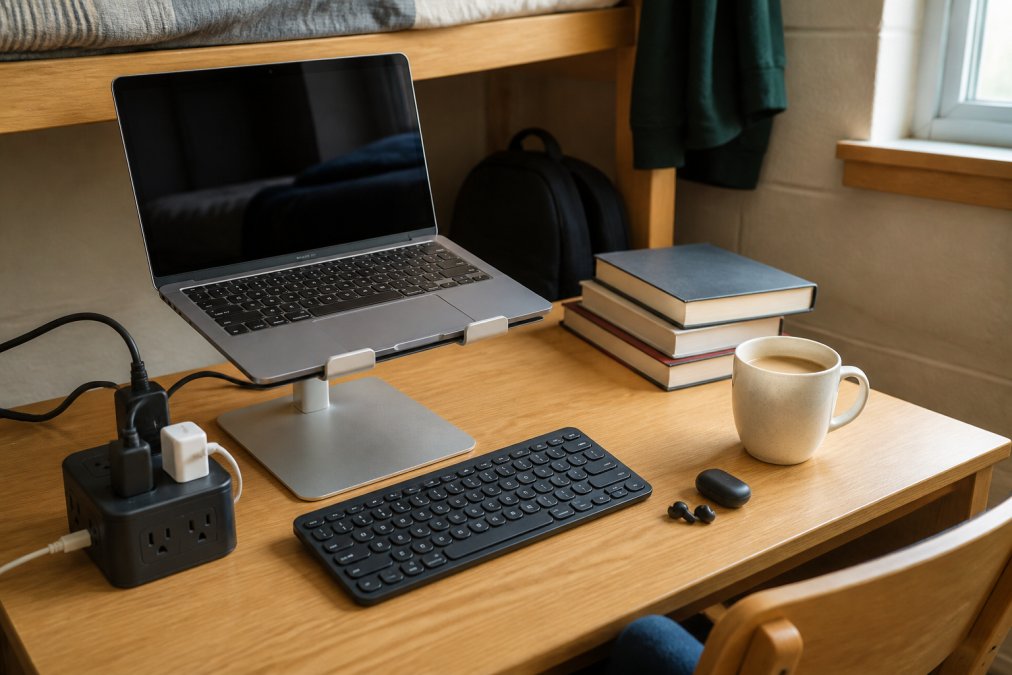
Four categories cover the floor: a laptop, audio gear, charging hardware, and one or two accessories that replace something you would otherwise carry. Skip anything that duplicates a function you already have.
Audio and focus gear. Noise-canceling earbuds are the single most underrated study purchase. Shared dorms, busy libraries, and loud roommates make active noise cancellation a productivity tool, not a luxury. The LED Display Noise-Canceling Bluetooth Earbuds ($17.99) deliver active noise cancellation, a built-in LED battery display, and a lightweight ergonomic fit. For students who study in transit, the battery readout alone saves the guesswork of "will these die before my lecture ends."
Power and charging. Dorm rooms rarely have enough outlets. The Power Bar with USB ($20.09) packs 4 AC outlets and 3 USB ports into a small cube with a 5-foot flat-plug cord. It charges up to 7 devices at once and includes overload protection. It also fits neatly on a nightstand or desk without blocking the outlet behind it.

Major-Specific Add-Ons
General lists stop at the base kit. The real spending decision is the layer on top, and it changes by field.
Engineering, computer science, and data-heavy majors. Prioritize RAM and storage over screen size, and budget for an external monitor before you budget for a tablet.
Longevity: Make the Kit Last Four Years
Most guides stop at the purchase. The students who spend the least over four years follow a few maintenance rules:
- Battery health. Keep laptops and earbuds between 20% and 80% charge when you can. Heat is the real killer, never charge a laptop on a bed or under a pillow.
- Cables first. The cheapest failure point is the cable, not the device. Buy two spares of every cable you rely on and label them.
- Cases and screen protectors. A $15 case on a $1,200 laptop is the highest-return purchase in the entire kit.
- Annual cleaning. Compressed air on vents and keyboard once a semester prevents the thermal throttling that makes a two-year-old laptop feel five years old.
- Warranty tracking. Photograph every receipt and warranty card the day you buy. Claims are far easier with proof on file.
Best Student Tech Discounts 2026: What to Expect
Verified student pricing typically runs 5% to 25% off, depending on the brand. Some brands offer discounts on tech products for verified students, while others run sitewide discounts for the same group.
| Discount Type | Typical Range | Best Applied To |
|---|---|---|
| Sitewide student discount | 5% | Accessories, cables, small gear |
| Category discount | 10-25% | Headphones, peripherals, laptops |
| Bundled student pricing | Varies | Software plus hardware packages |
| Trade-in credit | Varies | Upgrading an older device |
How to Verify Student Status for Discounts
Student verification is the process of confirming current enrollment through a third-party service or institutional login before a retailer unlocks discounted pricing. It is the gate that decides whether every discount number in this guide is real for you. Most programs use a verification platform that checks your name, school, and enrollment dates against a database.
The Major Verification Platforms
Retailers rarely run verification themselves. They outsource to one of a few services, and knowing which one a store uses tells you what to prepare:
- SheerID. The most widely used platform for brand-level student discounts. Accepts a school email, a student ID upload, or a tuition receipt. Approval is often instant when the school database matches.
- UNiDAYS. Common with apparel, software, and lifestyle brands. Requires account creation and typically a school email or document upload.
- Student Beans. Similar model, strong in food, fashion, and subscription categories.
- ID.me. Used heavily by government, telecom, and some hardware retailers. Often requires a government ID plus enrollment proof, and re-verifies more aggressively.
- Institutional login (SSO). Some universities and software vendors skip third-party verification entirely and authenticate through the school's single sign-on. This is the fastest path when it is available.
The Practical Sequence
- Gather proof of enrollment. A current student ID, tuition receipt, or class schedule works for most platforms. A school email address alone is enough for some.
- Check which platform the retailer uses. The discount page will name it. Create the account there, not on the retailer's site.
- Submit your school email or upload documentation. Use your .edu address when possible, it clears faster than a manual document review.
- Wait for approval. Instant to a few days. Manual reviews during peak back-to-school weeks can stretch longer.
- Re-verify annually. Most statuses expire after 12 months, and some expire at the end of each academic term.
Where Verification Fails
Most students who lose a discount do so for one of five reasons:
- Expired status. The single most common cause. Re-verify before opening a support ticket.
- Email mismatch. The name on your school email does not match the name on your billing address.
- Graduation or leave of absence. Enrollment databases update on a lag, so a status can drop weeks after you stop enrolling.
- Part-time enrollment. Some programs require full-time status. Check the terms before assuming you qualify.
- Shared accounts. Verification is tied to one person. Letting a roommate use your discount can void it for both of you.
Stacking, Timing, and Trade-Offs
Two rules govern how far verification actually stretches a budget:
- Stacking is rare. Most brands prohibit combining a student discount with a sale price or a coupon code. Read the terms, the discount usually applies to full-price items only.
- Timing beats depth. A 25% student discount on a full-price laptop can cost more than the same laptop on sale without verification. Compare the verified price against the current sale price before you commit.
Smart Accessories That Earn Their Place in Your Bag
Portable Foldable Keyboard ($30.21). An 81-key Bluetooth keyboard with a built-in touchpad that folds to roughly the size of a phone. It pairs with three devices at once and switches between them with Fn+1/2/3, which makes it genuinely useful for tablet note-taking. Battery runs 35 hours per charge with 90 days of standby.
Budgeting for Back-to-School Tech in 2026
- Laptop or tablet: 50-60% of budget
- Audio and focus gear: 10-15%
- Charging and power: 5-10%
- Accessories and peripherals: 15-20%
- Software subscriptions: 5-10%
Two angles most guides skip: refurbished and trade-in. Certified refurbished gear often carries the same warranty as new, and trade-in credit offsets an upgrade without a full-price hit. Both stretch a fixed budget further than any coupon.
Conclusion
The hardest part of back-to-school tech shopping isn't finding deals. It's knowing which deals actually matter for your major, your dorm, and your study habits.
Frequently Asked Questions
What are some college student discounts for electronics in 2026?
Verified students can find discounts ranging from 5% to 25% on tech products. Some brands offer discounts on tech products for verified students, while others provide sitewide discounts. These gadget sales for college students often stack with seasonal promotions, so checking brand student portals before buying can stretch your budget further.
How can college students verify their status for tech discounts?
Most brands use a verification service like SheerID or require a .edu email address. You typically upload a student ID, transcript, or enrollment letter. Once verified, you receive a unique code or link that unlocks the discount at checkout. The process usually takes a few minutes, and verification may need to be renewed each semester or year.
Which gadgets are considered essential for college students in 2026?
Must-have college electronics include a reliable laptop, noise-canceling earbuds for studying, a portable charger to keep devices alive through long days, and a compact power strip for dorm rooms with limited outlets. A foldable keyboard and laptop stand also help with ergonomics during long study sessions. These items cover the core needs of academic success and campus life.
Are there specific times of year when gadget sales for students are best?
Back-to-school season from July through September brings the deepest discounts, with many brands rolling out student-specific offers. Black Friday and Cyber Monday in November also deliver strong deals on laptops, headphones, and accessories. Some retailers run spring promotions in January and May, but the widest selection and best pricing typically appear during the back-to-class window.