

Table of Contents
- Step 1: Set Your Ergonomic Monitor Height
- Step 2: Adjust Your Desk and Chair Height for Proper Alignment
- Step 3: Position Your Keyboard and Mouse for Forearm Alignment
- Step 4: Learn How to Sit at a Desk Correctly
- Step 5: Perform Neck Stretches for Desk Workers Throughout Your Day
- Step 6: Take Micro-Breaks Every 15-30 Minutes
- Step 7: Invest in Ergonomic Tools to Support Your Workstation
- Frequently Asked Questions
Last Updated: September 25, 2026
Step 1: Set Your Ergonomic Monitor Height
The top of your monitor should sit at or slightly below eye level. This is the single most important adjustment you can make to prevent neck strain at desk work. When your screen is too high or too low, your cervical spine compensates by tilting your head forward or backward for hours at a time.
According to the 2026 Ergonomic Workstation Calibration Guide, maintaining proper ergonomic monitor height is non-negotiable. Position your display 20 to 26 inches away from your eyes. Your gaze should naturally fall on the upper third of the screen.

Sit in your normal position and look straight ahead, your eyes should hit the monitor at or just below the horizontal centerline. Raise it if you're looking down; lower it if you're looking up.
Most neck strain comes from this single mistake. A laptop screen sits too low by default. Use the Modulemaster Laptop Stand ($45.35) to elevate your laptop to the proper height. The adjustable stand reduces neck and eye strain while keeping your setup portable.
Step 2: Adjust Your Desk and Chair Height for Proper Alignment
Sit with feet flat on the floor and forearms parallel to the ground, your elbows should bend at roughly 90 degrees. If your desk is too high, your shoulders hunch; if too low, you hunch forward. Both create neck and shoulder tension. Standard desk height is 30 inches and chair height ranges from 17 to 21 inches, but adjust both to fit your body.

The real fix: adjust your chair first. Set it so your feet are flat and your thighs are parallel to the floor. Then adjust your desk so your forearms sit level.
Step 3: Position Your Keyboard and Mouse for Forearm Alignment
Your keyboard and mouse position directly affects your neck. When you reach too far forward or to the side, your shoulders roll inward. Your head follows. Your cervical spine twists.
Step 4: Learn How to Sit at a Desk Correctly
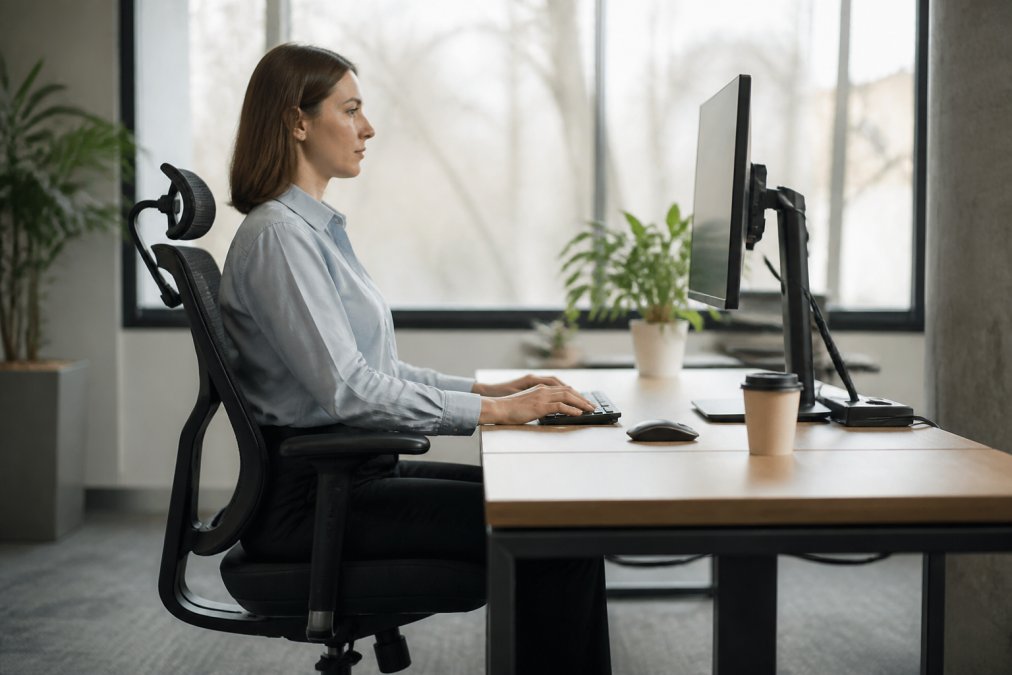
Sit with your lower back against the backrest, shoulders relaxed, head directly over your shoulders, feet flat, thighs parallel to the ground, and knees at 90 degrees. You cannot hold this position all day, muscle fatigue is normal and expected.
Step 5: Perform Neck Stretches for Desk Workers Throughout Your Day
Stretching breaks the tension cycle that builds during desk work. Different setups create different strain patterns, so targeted stretches are more effective than random ones.
Targeted Stretches for Desk Workers
Upper Trapezius Stretch (Most Important for Desk Workers)
- Sit upright and gently pull your right ear toward your right shoulder. Hold for 20-30 seconds. Repeat on the left side, 2-3 times per side, 2-3 times daily.
- Why this matters: This muscle fatigues first during desk work and releasing it prevents tension from spreading to your neck and shoulders.
Levator Scapulae Stretch (For Shoulder Blade Tension)
- Sit upright, turn your head 45 degrees to the right, and gently pull your chin toward your right armpit. Hold for 20-30 seconds. Repeat on the left side, 2-3 times per side, 2-3 times daily.
- Why this matters: When tight, this muscle pulls your shoulder up and head forward, amplifying desk posture strain.
Suboccipital Release (For Base-of-Skull Tension)
- Place your fingertips at the base of your skull and gently press upward. Tilt your chin down slightly. Hold for 15-20 seconds and repeat 2-3 times.
- Why this matters: These muscles are a major source of tension headaches and neck stiffness in desk workers.
Neck Flexion and Extension (For Overall Mobility)
- Slowly drop your chin toward your chest and hold for 15-20 seconds. Slowly tilt your head back and hold for 15-20 seconds. Repeat 2-3 times each direction.
- Why this matters: This maintains cervical spine mobility and prevents stiffness from holding one position all day.
Neck Rotation (For Rotational Strain)
- Turn your head to look over your right shoulder. Hold for 15-20 seconds.
- Turn your head to look over your left shoulder. Hold for 15-20 seconds.
- Repeat 2-3 times each side.
- Why this matters: If you use dual monitors or frequently turn to look at a phone or document, this stretch prevents the rotational strain that accumulates on one side of your neck.
Shoulder Rolls (For Shoulder-Neck Connection)
- Lift both shoulders toward your ears. Hold for 2 seconds.
- Roll them backward in a slow, controlled motion. Complete 5 backward rolls.
- Roll them forward 5 times.
- Repeat the full sequence 2-3 times.
- Why this matters: Your shoulders and neck are biomechanically linked. Releasing shoulder tension prevents it from pulling on your cervical spine.
Step 6: Take Micro-Breaks Every 15-30 Minutes
A micro-break is a structured 60-90 second routine that interrupts muscle fatigue patterns. Your neck muscles fatigue after 15-20 minutes, and a micro-break resets this clock by preventing strain accumulation rather than undoing it.
The 60-Second Desk-Based Micro-Break Routine
Seconds 0-10: Neck and Shoulder Reset
- Stand up (or remain seated if you prefer).
- Roll your shoulders backward 5 times in a slow, controlled motion. Feel your shoulder blades draw together slightly.
- Roll them forward 5 times.
- This interrupts the forward-hunched posture that accumulates during focused work.
Seconds 10-25: Cervical Spine Mobility
- Slowly turn your head to look over your right shoulder. Hold for 3 seconds.
- Return to center.
- Slowly turn your head to look over your left shoulder. Hold for 3 seconds.
- Return to center.
- Repeat this sequence 2 more times (3 rotations total each direction).
- This restores rotational mobility and prevents the stiffness that comes from staring straight ahead.
Seconds 25-40: Upper Trapezius Release
- Gently tilt your right ear toward your right shoulder. Do not force it. Hold for 5 seconds.
- Return to center.
- Gently tilt your left ear toward your left shoulder. Hold for 5 seconds.
- Return to center.
- Repeat once more (2 sets total).
- This targets the muscle that fatigues fastest during desk work.
Seconds 40-60: Movement and Blood Flow
- Stand up (if seated) and walk to get water, use the bathroom, or move to a different room for 15-20 seconds.
- If you cannot leave your desk, stand and do 10 arm circles forward and 10 backward.
- This increases blood flow to your neck and shoulders, delivering oxygen to fatigued muscles.
Micro-Break Variations for Different Desk Setups
Step 7: Invest in Ergonomic Tools to Support Your Workstation
The right tools make prevention effortless. Bad tools work against you.
| Intervention | Frequency | Time Required | Impact |
|---|---|---|---|
| Monitor height adjustment | Once during setup | 5 minutes | Prevents constant downward strain |
| Desk and chair alignment | Once during setup | 10 minutes | Eliminates shoulder and neck compensation |
| Keyboard and mouse positioning | Once during setup | 5 minutes | Reduces reaching and twisting |
| Micro-breaks | Every 15-30 minutes | 2 minutes | Prevents muscle fatigue and tension |
| Neck stretches | Every 2-3 hours | 5 minutes | Releases accumulated tension |
| Ergonomic tools | Ongoing use | Passive | Supports proper alignment throughout day |
Frequently Asked Questions
What is desk neck syndrome and how do I know if I have it?
Desk neck syndrome, commonly called tech neck, occurs when your neck stays in a forward or strained position for extended periods while working at a desk. Symptoms include persistent neck pain, shoulder tension, headaches, and reduced range of motion. If you experience these after long work sessions, your workstation setup likely needs adjustment. A 2026 study found that up to 80% of office workers deal with poor ergonomic setups that cause neck strain. Addressing your monitor height, posture, and taking regular breaks can reverse these symptoms quickly.
How often should I take breaks to prevent neck strain at my desk?
Health experts recommend moving every 15 to 30 minutes to mitigate the effects of sedentary desk work. A 2026 study on Upper Crossed Syndrome suggests taking standing breaks every hour and performing short desk exercises every 20-30 minutes. Micro-breaks, even just 1-2 minutes of movement, help relax your neck and shoulders. Setting a timer on your phone or using a break reminder app makes this habit automatic. The key is dynamic sitting: changing your posture and position regularly rather than staying static.
Can monitor height really affect my neck pain?
Yes. The 2026 Ergonomic Workstation Calibration Guide specifies that the top of your display must sit at or slightly below eye level to prevent constant strain on your cervical spine. When your monitor is too low, your neck bends forward, creating repetitive strain. When it's too high, you crane backward. Positioning it correctly keeps your cervical vertebrae in a neutral, relaxed position. If you use a laptop, the Modulemaster Laptop Stand ($45.35) adjusts to the proper height, reducing neck and eye strain during long work sessions.
What exercises are best for relieving neck tension from desk work?
Ergonomic training and therapeutic exercises are most effective at addressing neck pain and impaired posture, according to the National Institutes of Health. Simple desk stretches include neck rotations (turning your head side to side), shoulder shrugs, and chin tucks. A 2026 study recommends performing micro-movements every 10 minutes, such as moving your neck from side to side. The Heated Neck & Spine Massager ($70.99) combines vibration therapy and heat to relax tight muscles and reduce fatigue when stretching alone isn't enough. Consistency matters more than intensity, light, frequent movement beats occasional intense stretching.