

Table of Contents
- What 'Refurbished' Actually Means (and What It Doesn't)
- Understanding the Refurbished Electronics Grading System
- Step-by-Step: How to Verify Refurbished Electronics Quality on Arrival
- How to Check Battery Health on Refurbished Devices
- Testing Internal Components: Audio, Camera, and Thermal Performance
- Refurbished Electronics Warranty Coverage: What to Demand Before You Buy
- How to Verify Refurbished Electronics Quality Through Seller Reputation
- Pros and Cons of Buying Refurbished Electronics
Last Updated: August 19, 2026
What 'Refurbished' Actually Means (and What It Doesn't)
Knowing how to verify refurbished electronics quality before purchase is essential. According to Coherent Market Insights' Refurbished Electronics Market Report, the global refurbished electronics market was valued at $68.24 billion in 2026 and is projected to reach $136.40 billion by 2033. Nearly one in five consumer electronics purchases in developed economies involves a certified pre-owned device.
But here's what most buyers get wrong: "refurbished" is not a single standard. It's a spectrum.
Refurbished electronics covers any device returned, repaired, or restored to working condition before resale. The critical distinction is who did the refurbishing and what process they followed. A device returned to a manufacturer within two days, fully tested, and repackaged sits in a completely different category from a unit repaired by an unknown third party with no documentation.
What refurbished does NOT mean: broken, unreliable, or cosmetically wrecked. Many refurbished units are customer returns with zero functional defects, opened solely because the buyer changed their mind. The real risk isn't the device's past. It's the seller's process.
Understanding the Refurbished Electronics Grading System
The refurbished electronics grading system attempts to standardize condition descriptions, but remains inconsistently applied across sellers. Understanding it is your first line of defense.
Grade A, B, and C: What Each Level Covers
Most sellers use a three-tier cosmetic grading structure:
| Grade | Cosmetic Condition | Expected Flaws | Best For |
|---|---|---|---|
| Grade A | Like new | No visible scratches under normal lighting | Buyers who want near-new aesthetics |
| Grade B | Good | Minor scratches, light scuffs on chassis | Value-focused buyers comfortable with light wear |
| Grade C | Fair | Noticeable scratches, possible dents | Budget buyers prioritizing function over form |
Grades reflect cosmetic condition only. A Grade C device can have perfect internal components. A Grade A device can still have a degraded battery. Never assume cosmetic grade equals overall quality.
Certified Refurbished vs. Seller-Graded: The Key Difference
Certified refurbished means a device has been inspected, tested, and restored to manufacturer specifications, typically by the original manufacturer or an authorized partner. Seller-graded simply means the seller assigned a condition label themselves, with no independent verification.
According to a UN Environment Programme study on refurbished electronics, nearly 50% of respondents said they were willing to purchase electronics certified as refurbished when major brands are directly involved in the process.
Certifications to look for include R2v3 from SERI (Sustainable Electronics Recycling International), which validates responsible refurbishment, data destruction, and materials management. Manufacturer-certified programs from major brands also carry weight because they enforce standardized testing protocols and typically include genuine OEM parts.
Step-by-Step: How to Verify Refurbished Electronics Quality on Arrival
The moment your device arrives is your most important window. Most return policies run 15 to 30 days, and every day you delay inspection is a day you lose from your return window stress-testing period.
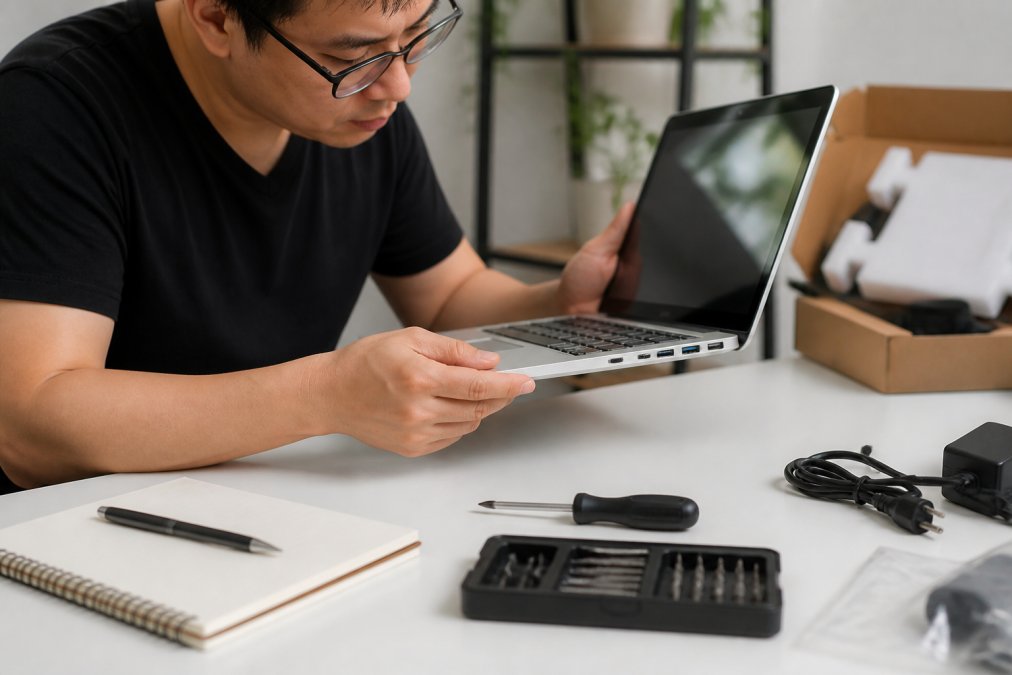
Unboxing Checklist: What to Confirm Before Powering On
Work through this checklist before the device touches a power source:
- Confirm the device model and serial number match the listing exactly
- Check that all advertised accessories are present (charger, cables, documentation)
- Inspect the outer packaging for signs of rough handling or repackaging inconsistencies
- Look for any activation lock or device locking indicators on the screen before powering on
- Verify the IMEI or serial number against a carrier blacklist database (for smartphones)
- Confirm the device is not enrolled in any mobile device management (MDM) system
A device still enrolled in a corporate MDM will show a management screen on setup and may be unusable without the original organization's credentials. This is one of the clearest signs of a 'fake' refurbished unit.
Physical Inspection: Chassis, Ports, Screen, and Hinge
Start the hardware inspection systematically.
Screen surface: Check pixel integrity under a white background at full brightness. Look for dead pixels, backlight bleed along edges, and any discoloration.
Chassis and hinge tension: On laptops, open and close the lid repeatedly. Hinge tension should feel consistent throughout the range of motion. Loose or grinding hinges signal previous damage or heavy use.
Port functionality: Plug something into every port. USB ports that feel loose or fail to recognize devices, headphone jacks with crackling audio, and SD card slots that stick are common failure points.
Keyboard and trackpad: Type every key individually. Check for sticking keys, uneven travel, or keys that register double inputs.
Spotting Liquid Damage Indicators
Liquid exposure is the hidden defect that kills devices months after purchase. Manufacturers install liquid contact indicator strips inside most modern devices, typically visible through the SIM tray slot or near charging ports. A triggered indicator turns red or pink.
Beyond the official indicators, look for corrosion or white residue around port openings, discoloration on screws visible through the chassis, a faint musty or chemical odor when the device warms up, and inconsistent touchscreen response in localized areas.
How to Check Battery Health on Refurbished Devices
Battery health is the single most important long-term quality indicator on any refurbished device. According to PYMNTS.com's 2026 consumer survey on refurbished electronics, 65% of consumers say a warranty would increase their confidence in buying refurbished electronics. Battery replacement coverage is a major component of that confidence.
Built-In Battery Diagnostics by Platform
iPhone/iPad: Navigate to Settings > Battery > Battery Health & Charging. Any device above 80% maximum capacity is generally acceptable. A refurbished iPhone should show 85% or higher.
Android: Most Android manufacturers include battery health information in the device settings under Battery or About Phone. Samsung devices offer detailed diagnostics through the built-in *#0228# service menu.
MacBook: Hold Option and click the Apple menu > System Information > Power. This reveals cycle count, condition status, and maximum capacity. A MacBook battery is rated for 1,000 cycles before Apple considers it consumed.
Windows laptops: Open Command Prompt as administrator and run powercfg /batteryreport. The resulting HTML report shows design capacity vs. current full charge capacity. A ratio below 75% warrants negotiation or rejection.
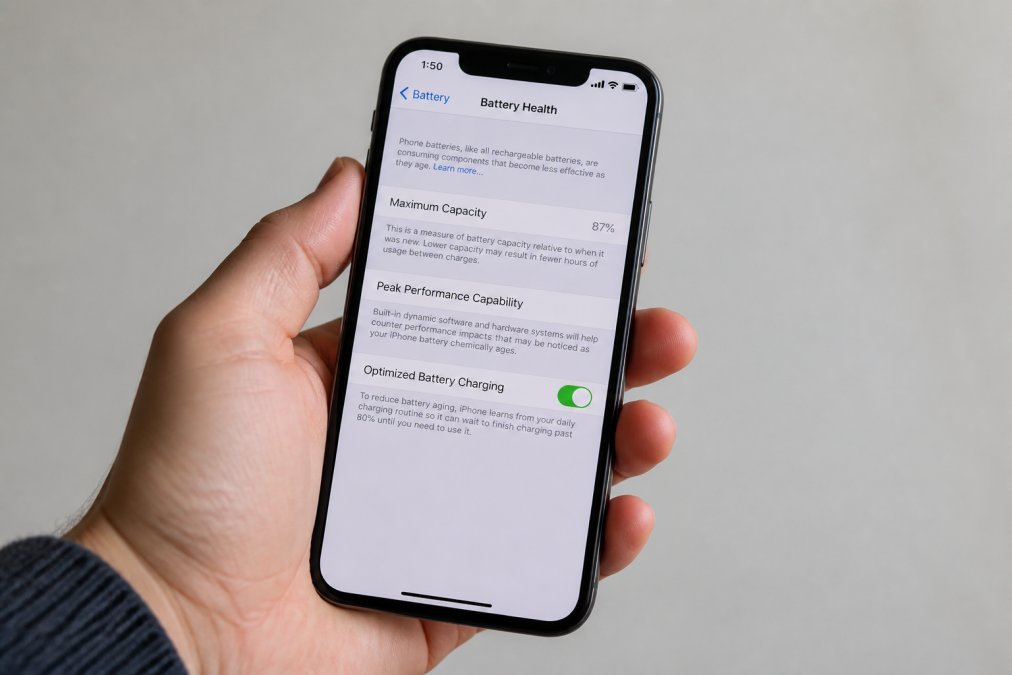
Third-Party Diagnostic Software Tools
Built-in tools only tell part of the story. Third-party diagnostic software provides deeper hardware inspection.
For laptops and desktops:
- HWiNFO (Windows): Reads real-time sensor data including CPU temperatures and fan speeds.
- CrystalDiskInfo (Windows): Checks SSD and HDD health using S.M.A.R.T. data.
- coconutBattery (macOS): Provides detailed battery cycle count and capacity history.
For smartphones: Reputable diagnostic apps test touch sensitivity, speaker frequency response, microphone sensitivity, camera focus, and accelerometer calibration in a single session.
When buying from a certified refurbisher, ask whether they use standardized diagnostic protocols and whether the report is available to the buyer.
Testing Internal Components: Audio, Camera, and Thermal Performance
Most buyers power on a refurbished device and call it done. That's not a quality check.
Audio output and microphone sensitivity: Play a frequency sweep from 20Hz to 20kHz through the speakers. Distortion at high frequencies or buzzing at low frequencies indicates speaker damage. Record a voice memo and play it back to check for muffled audio or excessive background noise.
Camera: Test every lens individually. Check autofocus speed, optical image stabilization by recording video while walking, and front camera exposure accuracy.
Thermal performance: Run the device under load for 15 minutes. On laptops, open several browser tabs, stream video, and run a CPU benchmark simultaneously. Severe thermal throttling signals inadequate thermal paste replacement during refurbishment.
Refurbished Electronics Warranty Coverage: What to Demand Before You Buy
Warranty coverage separates serious sellers from opportunists.
A legitimate refurbished device should carry a minimum 90-day warranty. The strongest sellers offer 12 months or more. According to Dataintelo's 2026 consumer confidence report, more than 62% of consumers in North America reported willingness to purchase a refurbished smartphone when offered a warranty of at least 12 months.
Before purchasing, confirm:
- What the warranty covers: Does it include hardware failures only, or also battery degradation below a threshold?
- Who backs the warranty: Is it the seller, the refurbisher, or the manufacturer?
- How claims are processed: Is there a prepaid return label, or do you pay to ship?
- Whether the warranty is transferable: Relevant if you plan to resell the device.
A 30-day return window is the minimum acceptable for refurbished electronics. Sellers offering fewer than 15 days are not giving you enough time to conduct a proper stress test.
How to Verify Refurbished Electronics Quality Through Seller Reputation
Seller reputation is the pre-purchase equivalent of everything else in this guide. A verified, high-reputation seller makes the physical inspection easier because you're starting from a position of baseline trust.
For marketplace sellers, check order defect rates and return dispute history. Sellers with consistent negative feedback specifically mentioning "not as described" or "different than advertised" are telling you something important.
Red Flags That Signal a 'Fake' Refurbished Unit
A 'fake' refurbished unit is a device described as refurbished that received no meaningful testing or restoration. Watch for:
- Vague condition descriptions with no grading system reference
- No mention of what was tested or what the refurbishment process involved
- Prices significantly below market rate for the stated condition grade
- No serial number or IMEI provided in the listing
- Stock photos only, with no actual photos of the specific unit
- Seller account created recently with minimal transaction history
A professional refurbisher documents their process. If the listing reads like a classified ad rather than a product specification, treat it accordingly.
Return Window Stress-Testing: Using Your Trial Period Wisely
The return window is a structured testing protocol. During your return window, deliberately subject the device to conditions that mirror your actual use:
- Run video calls for 60 minutes to test camera, microphone, speaker, and thermal performance simultaneously
- Connect every peripheral you plan to use regularly
- Charge and discharge the battery at least two full cycles to confirm capacity holds
- Test wireless connectivity (Wi-Fi, Bluetooth) under load
- On laptops, run the battery report again after a week to confirm capacity hasn't dropped
If a defect is going to surface under normal use, this approach surfaces it within your return window.
Pros and Cons of Buying Refurbished Electronics
Refurbished electronics quality has improved substantially, but the decision involves real trade-offs.
Pros:
- Cost savings: Refurbished IT equipment saves 30-50% compared to new, according to GreenTek Solutions (2026)
- Environmental impact: 15% of US adults cite e-waste reduction as a key driver for buying refurbished
- Access to premium hardware: Previous-generation premium devices offer near-equivalent performance at a meaningful discount
- Improving quality standards: AI-powered diagnostics and blockchain traceability are raising the floor on refurbishment quality
Cons:
- Inconsistent standards: Without certification, quality varies dramatically between refurbishers
- Battery uncertainty: Even certified devices can have batteries that degrade faster than expected
- Shorter or limited warranty: Most refurbished warranties don't match the 1-2 year coverage standard on new devices
- Purchase gap: Despite 76% of consumers saying they would consider buying refurbished, only 45% have actually done so (PYMNTS.com, 2026)
The bottom line: a certified refurbished device from a reputable seller, verified using the steps in this guide, represents genuine value. An uncertified device from an unknown seller is a gamble, regardless of the price.
Buying refurbished electronics without a verification process is how buyers get burned. The gap between a reliable certified device and a poorly refurbished unit comes down to the inspection steps you take before and after it arrives. TechyDealy's hassle-free return policy and curated selection of high-quality tech mean you're not left navigating that uncertainty alone. Shop Smart Essentials at TechyDealy and get the performance you need with the confidence of a straightforward return process backing every purchase.
Frequently Asked Questions
What is the difference between used and refurbished electronics?
Used electronics are sold as-is, with no testing or repairs performed after their previous owner returned or traded them in. Refurbished electronics go through a documented process that includes inspection, component testing, data wiping, and often part replacement before resale. Certified refurbished devices must meet specific performance benchmarks set by the manufacturer or a vetted third party. That structured process is what separates a refurbished device from a secondhand one bought through a private seller.
Are refurbished electronics covered by a warranty?
Refurbished electronics warranty coverage varies by seller. Manufacturer-certified programs typically include 90 days to one year of coverage. A 2026 PYMNTS survey found that 65% of consumers say a warranty would increase their confidence in buying refurbished electronics. Reputable third-party refurbishers, such as JC-Electronics, offer a standard two-year warranty. Always confirm the warranty length, what it covers, and whether the seller handles claims directly before purchasing.
How do I check the battery health of a refurbished device?
On iPhone, go to Settings > Battery > Battery Health & Charging to see maximum capacity. On Mac, hold Option and click the battery icon to view cycle count. Windows laptops require running 'powercfg /batteryreport' in Command Prompt to generate a detailed battery report. Android devices vary by manufacturer, but third-party apps can surface cycle count and charge capacity data. Any refurbished device with battery health below 80% warrants negotiation or rejection, since a degraded battery shortens the device's usable lifespan significantly.
How can I tell if a refurbished device is actually 'fake' refurbished?
A fake refurbished unit is typically a used device relisted with a cosmetic clean-up but no real hardware inspection. Warning signs include no documented grading system, missing or vague warranty terms, non-OEM replacement parts, and firmware that hasn't been updated or factory reset. Check the IMEI or serial number against the manufacturer's database to confirm the device's history. Sellers who cannot provide a grading certificate or testing report are a significant red flag.
This article was written using GrandRanker