

Table of Contents
- How We Evaluated These Ergonomic Gaming Chairs
- Quick Comparison: Top Rated Ergonomic Gaming Chairs 2026
- Best Gaming Chair for Back Pain: Top Picks Ranked
- Gaming Chair vs Office Chair Ergonomics: What Actually Differs
- Gaming Chair Weight Capacity Guide: Finding Your Right Fit
- How to Adjust a Gaming Chair for Posture That Actually Helps
- Long-Term Durability and Material Quality: What Holds Up After 12 Months
- Complete Your Ergonomic Setup Beyond the Chair
Last Updated: August 14, 2026
Most people spend more time researching a new monitor than the chair they sit in for eight hours a day. That's a mistake that compounds into real back pain, poor posture, and declining focus. This guide covers lumbar support quality, weight capacity, material durability, and how to dial in your setup for posture that genuinely helps.
How We Evaluated These Ergonomic Gaming Chairs
Ergonomic gaming chairs earn their rating through sustained performance. Our evaluation process covered six core criteria: lumbar support quality and adjustability, seat depth and width relative to weight capacity, armrest range (2D, 3D, or 4D), backrest height and recline tension control, material breathability and durability, and assembly quality as an indicator of frame construction.

We also factored in long-term user feedback from verified purchasers with 12+ months in each chair. What distinguishes a well-engineered ergonomic gaming chair is how the high-density foam holds its shape, whether the gas lift cylinder maintains height without drift, and whether the upholstery shows premature wear at stress points.
| Evaluation Criteria | Weight in Scoring | Key Metric |
|---|---|---|
| Lumbar support & spinal alignment | High | Adjustability range, firmness |
| Seat depth & width | High | Fit for stated weight capacity |
| Armrest range (4D vs. 2D) | Medium | Degrees of adjustment |
| Material quality | Medium | Breathability, wear resistance |
| Recline & tension control | Medium | Angle range, lock positions |
| Assembly & frame construction | Standard | Hardware quality, wobble test |
Quick Comparison: Top Rated Ergonomic Gaming Chairs 2026
Quick Picks:
- Best for Back Pain: High-back chair with independent lumbar adjustment and 4D armrests
- Budget Pick: Solid lumbar support under $300 with 3D armrests and adjustable headrest pillow
- Best Mesh Option: Full breathable mesh backrest for long sessions in warm environments
- Best for Larger Frames: Wide seat base with 400 lb. weight capacity and reinforced frame construction
| Chair Type | Price Range | Best For | Lumbar Support | Armrests |
|---|---|---|---|---|
| Budget ergonomic | Under $300 | Casual to moderate use | Fixed or 1D | 2D-3D |
| Mid-range ergonomic | $300-$500 | Daily 6-8 hour sessions | Adjustable | 3D-4D |
| Premium orthopedic | $500-$900 | Professionals, chronic pain | Full orthopedic | 4D |
| Mesh ergonomic | $250-$600 | Hot climates, long sessions | Adjustable | 3D |
| Heavy-duty | $350-$700 | 250+ lb. users | Reinforced | 3D-4D |
Best Gaming Chair for Back Pain: Top Picks Ranked
The best gaming chair for back pain supports the natural S-curve of the spine without forcing it. That means independent lumbar adjustment, a backrest height that reaches the upper thoracic region, and a seat depth that keeps your thighs fully supported without pressing behind the knees.
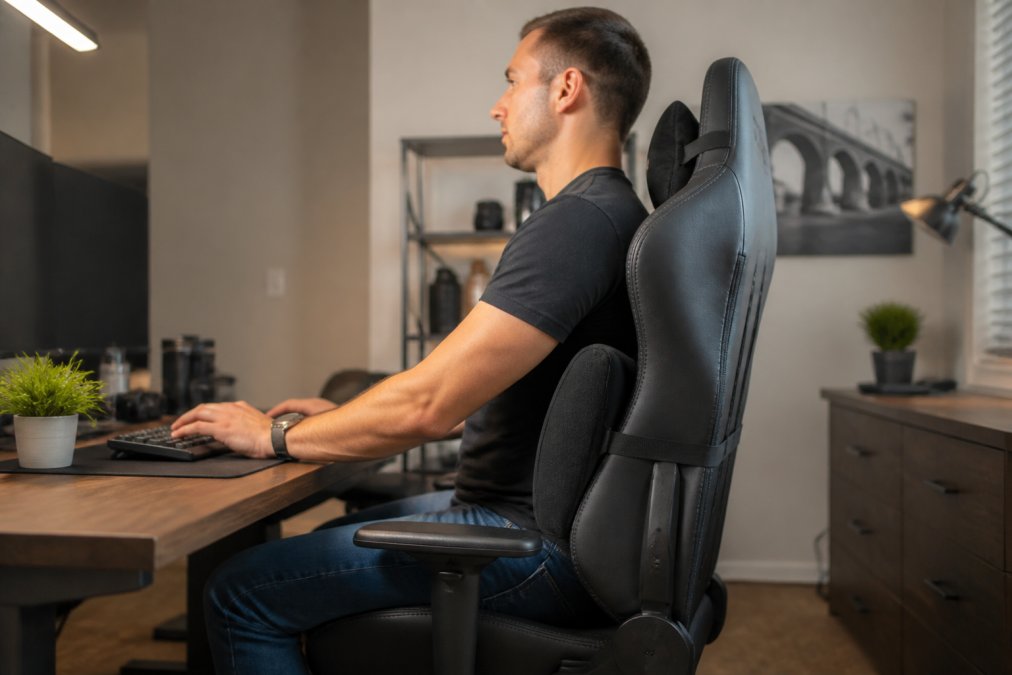
Most buying guides rank chairs by price without accounting for body type. A $600 chair sized for a 5'10" user is harmful for someone 5'5" or 6'3". Fit matters more than price.
Budget Pick: Strong Lumbar Support Under $300
For under $300, target a chair with an adjustable lumbar pillow or built-in lumbar knob, 3D armrests, and a recline angle of at least 135 degrees. Prioritize chairs where the seat pan is at least 19 inches wide and the backrest height clears 32 inches.
Budget chairs often use lower-density foam that compresses within six months. Press the seat cushion with your palm before purchase. If it rebounds in under two seconds, density is adequate. If it stays compressed, the chair will feel flat by month four.
Lumbar support at this tier is almost always a detachable pillow. Position it at belt height, not mid-back. Most users set it too high, which pushes the thoracic spine forward instead of supporting the lumbar curve.
Premium Pick: Full Orthopedic Support With 4D Armrests
Premium ergonomic gaming chairs in the $500-$900 range offer integrated lumbar mechanisms with both height and depth adjustment, 4D armrests that move forward/back, side to side, and rotate, and multi-zone recline with independent tension control. These features matter if you're logging more than six hours daily.
The defining feature of a true orthopedic-grade chair is independent lumbar adjustment that lets you dial in both the vertical position and the outward pressure of the lumbar support. This allows the chair to adapt to your specific spinal curve rather than imposing a generic curve on your spine.
4D armrests eliminate variables that cause shoulder tension and neck strain. Armrests that are slightly too high, too low, or angled wrong create pressure that a 4D system solves entirely.
Best Mesh Option: Breathable Fabric for Long Sessions
Breathable mesh backrests solve the biggest comfort problem with synthetic leather chairs: heat buildup. After 90 minutes in a PU leather chair, lack of airflow becomes the dominant discomfort. A quality mesh backrest maintains airflow throughout a session.
The tradeoff is pressure distribution. Mesh spreads load across a larger surface area than foam, which reduces hotspots but can feel less supportive for users who need firm lumbar pressure. The best mesh chairs address this with a tensioned lumbar zone, where the mesh is tighter in the lower third of the backrest.
For long-session gaming or remote work in warmer environments, breathable mesh is the clear choice. The material also shows less surface wear than synthetic leather over 12+ months at contact points.
Gaming Chair vs Office Chair Ergonomics: What Actually Differs
The gaming chair vs office chair debate is less about category and more about feature prioritization. Gaming chairs are engineered for visual appeal and recline range. Office chairs are engineered for posture correction during forward-leaning desk work.
The practical differences: gaming chairs typically offer deeper recline angles (often 150-180 degrees), which suits extended media consumption but can encourage poor posture during active work. Office chairs more commonly include seat depth adjustment as standard, which is critical for users whose thighs don't fit a fixed seat pan. Gaming chairs more often bundle headrest pillows, while office chairs rely on backrest height to support the cervical spine.
According to ergonomic guidance from the Occupational Safety and Health Administration, proper seated posture requires knees at approximately 90 degrees, feet flat on the floor, and the lumbar region supported. Both gaming and office chairs can meet this standard. A well-adjusted mid-range gaming chair with 4D armrests and an adjustable lumbar mechanism will outperform a poorly-adjusted premium office chair every time. Adjustability and correct setup beat category.
Gaming Chair Weight Capacity Guide: Finding Your Right Fit
Gaming chair weight capacity ratings undersell the importance of frame construction. A chair rated to 250 lb. with a thin steel frame and plastic base components is not the same as one rated to 250 lb. with a reinforced steel frame and aluminum base.
For users under 180 lb. and between 5'4" and 6'0", most standard ergonomic gaming chairs fit correctly. The seat width of 19-20 inches and backrest height of 32-34 inches covers this range.
For users between 180-250 lb., prioritize chairs with a stated weight capacity of at least 300 lb. The extra margin accounts for dynamic loading, which occurs every time you shift position or lean into the backrest.
For users over 250 lb. or taller than 6'2", look for:
- Seat width of 21 inches or more
- Weight capacity of 400 lb. with reinforced base
- Backrest height of 35+ inches
- Heavy-duty gas lift cylinder rated for the weight range
As documented in seating ergonomics research from Cornell University Ergonomics Lab, seat pan depth should allow 2-3 fingers of clearance between the seat edge and the back of the knee. For taller users, seat depth adjustment is non-negotiable.
How to Adjust a Gaming Chair for Posture That Actually Helps
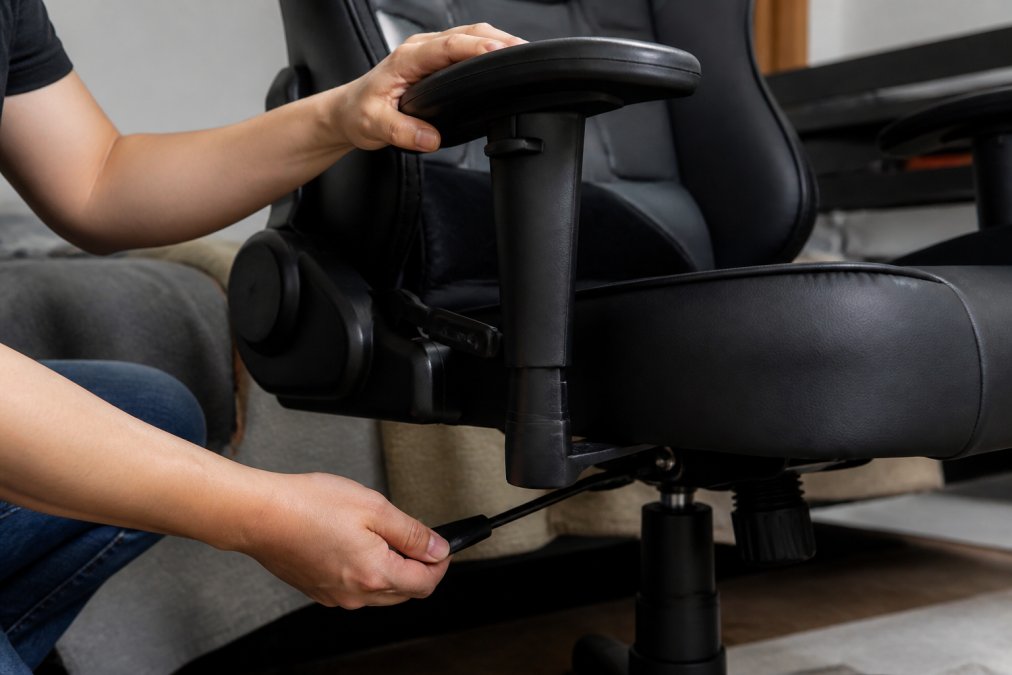
Most users unbox the chair, set the height so their feet touch the floor, and stop there. That leaves four or five critical adjustments untouched.
Seat Height and Depth Adjustment
Set seat height so your feet rest flat on the floor with knees at 90 degrees. If your feet dangle, the seat is too high and cuts circulation. If your knees rise above your hips, the seat is too low and flattens the lumbar curve.
Seat depth adjustment should position the seat edge 2-3 fingers behind the back of your knee. If your chair lacks seat depth adjustment and the pan is too long, a firm seat cushion at the back can compensate by effectively shortening the usable depth.
Check the tilt tension control next. The tension should allow a slight backward recline when you lean back but return to upright without effort. Too loose and you'll unconsciously recline throughout the session. Too tight and the resistance creates shoulder tension.
Lumbar Support and Headrest Pillow Positioning
Lumbar support should contact the small of your back at belt height, roughly the L3-L5 vertebrae region. This is lower than most users place it. If the lumbar support is pressing into your mid-back, shift it down two inches.
The headrest pillow is for use during reclined positions, not upright work. When working at a desk, the headrest should either lightly contact the base of the skull in neutral position, or be removed entirely. Using it during forward-leaning work pushes the head forward and increases cervical strain.
Long-Term Durability and Material Quality: What Holds Up After 12 Months
After 12 months of daily use, failure points are predictable: foam compression in the seat cushion, peeling or cracking at synthetic leather stress points, gas lift cylinder drift, and loosening at the base-to-cylinder connection.
High-density foam with a rating above 50 kg/m³ resists compression significantly better than standard foam. Chairs that feel firm on day one and maintain that firmness at the six-month mark are using adequate density. Chairs that soften within three months are not.
Synthetic leather durability depends on the backing material and coating thickness. Cheaper PU leather uses a thin polyurethane coating that begins to peel at flex points within 12-18 months. Higher-grade PU leather uses a thicker coating and sometimes a secondary bonding layer that extends usable life to three or more years.
Mesh rarely peels or cracks. The primary failure mode is sagging, where tension decreases over time and the backrest loses its support profile. Quality mesh chairs use a tensioned frame design that resists this.
According to furniture durability standards from the Business and Institutional Furniture Manufacturers Association, commercial-grade seating is tested to 100,000 cycle standards. Chairs meeting BIFMA x5.1 standards have passed independent structural testing that most consumer-grade gaming chairs have not.
Frame construction matters. All-steel frames outlast aluminum-steel hybrid frames in most cases, but aluminum bases offer better corrosion resistance. The weakest component in most gaming chairs is the plastic casing around adjustment mechanisms. Cracking or flexing during initial assembly predicts early failure.
Complete Your Ergonomic Setup Beyond the Chair
The chair is the foundation, but an ergonomic setup requires the full stack. A well-adjusted ergonomic gaming chair paired with a monitor at the wrong height or a mouse that forces wrist extension will still produce strain over time.
Monitor height should place the top of the screen at or just below eye level. The Modulemaster Laptop Stand from TechyDealy provides adjustable elevation that aligns the screen with natural eye level and frees up desk space. At $45.35 with complimentary ground shipping, it's one of the more straightforward upgrades in a full ergonomic build.

Mouse positioning matters more than most setups account for. A mouse that requires reaching forward or to the side creates shoulder abduction that compounds into rotator cuff strain. Keep the mouse close to the body, with the elbow at roughly 90 degrees. The 2.4G Wireless Ergonomic Gaming Mouse from TechyDealy uses a honeycomb design that reduces weight and heat buildup during long sessions, available at $12.94 with free shipping and hassle-free returns.
Keyboard position should keep wrists neutral, not extended upward. If your desk height forces wrist extension, a wrist rest or negative-tilt keyboard tray corrects this without requiring a new desk.
The throughline across all adjustments is the same principle: fit to the user, not the other way around. A dialed-in ergonomic environment, built around your specific height, weight, and work style, is what actually eliminates the fatigue and discomfort that accumulates over months of daily use.
Frequently Asked Questions
Which ergonomic gaming chair is best for back pain in 2026?
The best ergonomic gaming chairs for back pain combine adjustable lumbar support, high-density foam cushioning, and a recline angle between 90 and 135 degrees. Look for chairs with a separate lumbar pillow or built-in lumbar adjustment, 4D armrests, and seat depth adjustment so your lower spine stays supported across long sessions. Chairs with orthopedic-grade foam and a wide backrest that reaches shoulder height consistently outperform budget alternatives for spinal alignment.
What features should I look for in an ergonomic gaming chair in 2026?
Prioritize 4D armrests, adjustable seat depth, a tilt mechanism with tension control, and genuine lumbar support, either a built-in curve or a quality pillow. Breathable mesh or high-density foam upholstery matters for long sessions. Check the gas lift cylinder rating and base stability, since cheaper bases flex under load. Weight capacity, backrest height, and seat width should match your body dimensions before anything else.
Are expensive gaming chairs actually better for your posture?
Generally, yes, but only if you set them up correctly. Premium chairs offer more precise adjustability, better cushion density, and sturdier frame construction, all of which support posture correction over time. A $500 chair with poor adjustment habits will not help you more than a $250 chair dialed in properly. The biggest posture gains come from correct lumbar support placement, seat height, and armrest alignment, not the price tag alone.
Do ergonomic gaming chairs offer better support than office chairs?
Gaming chair vs office chair ergonomics comes down to design intent. High-end office chairs often provide superior adjustability and pressure relief for all-day sitting. Gaming chairs typically add a higher backrest, headrest pillow, and a more aggressive recline, which suits longer reclined sessions. For pure posture support during work hours, a certified ergonomic office chair often wins. For mixed gaming and work use, a well-specced gaming chair with 4D armrests and adjustable lumbar support is a practical middle ground.
How do I choose the right size gaming chair for my height and weight?
Use this as your baseline: if you are under 5'9" and under 200 lbs, a standard chair fits most needs. Taller users, 6'1" and above, should look for a backrest height of at least 33 inches and extended seat depth. Heavier users should confirm the weight capacity exceeds their body weight by at least 50 lbs for long-term frame integrity. Seat width should allow two fingers of clearance on each side of your hips when seated.
Back pain and fatigue from long gaming or work sessions are problems that compound quietly until they become serious. A properly selected and adjusted ergonomic gaming chair addresses the root cause rather than masking it. TechyDealy carries ergonomic accessories built to complete this setup, including laptop stands and wireless peripherals, all backed by complimentary ground shipping and a hassle-free return policy. Shop Smart Essentials and build the ergonomic setup that actually holds up.
This article was written using GrandRanker