

Table of Contents
- Quick Comparison: Best Budget Laptops for Remote Work
- Minimum Laptop Specs for Remote Work in 2026
- How to Choose a Laptop for Remote Work
- Top Budget Laptops for Remote Work: Our Picks
- Best Budget Laptop Accessories for Home Office
- Long-Term Cost of Ownership: What Budget Really Means
- Which Budget Laptop Should You Pick?
- Conclusion
Last Updated: August 18, 2026
Remote work isn't a pandemic-era experiment anymore. According to WFH Research remote work tracking data, approximately 22.8% of employees worked remotely at least part of the time as of March 2026, a figure that has held steady between 21% and 23% since early 2024. Millions of workers need reliable machines built for video calls, browser-heavy multitasking, and full workdays away from a corporate IT desk. This guide identifies the best budget laptops for remote work, with honest specs, real trade-offs, and clear recommendations for every type of remote worker.
Quick Comparison: Best Budget Laptops for Remote Work
The best budget laptops for remote work in 2026 deliver at least an Intel Core i5 (8th Gen or newer) or AMD Ryzen 5, 8-16 GB of RAM, a 256 GB SSD, and a Full HD display.
| Laptop | Price Range | RAM | Storage | Best For |
|---|---|---|---|---|
| Lenovo ThinkPad L14 | ~$550-$700 | 16 GB | 256-512 GB SSD | Reliability, keyboard comfort |
| Acer Swift 14 AI | ~$599-$699 | 16 GB | 512 GB SSD | Best overall value |
| Dell Inspiron 3530 | ~$400-$500 | 8-16 GB | 256-512 GB SSD | Entry-level Windows users |
| Chromebook (various) | ~$250-$400 | 4-8 GB | 64-128 GB eMMC | Cloud-first, light workloads |
Quick Picks:
- Best Overall Value: Acer Swift 14 AI, Forbes Vetted named it the best value laptop for working from home in 2026
- Best for Reliability: Lenovo ThinkPad L14, proven chassis durability, best-in-class backlit keyboard
- Best Entry-Level: Dell Inspiron 3530, solid state drive performance at the lowest price point
- Best for Cloud Workers: Chromebooks, unbeatable battery longevity and security for browser-based workflows
Minimum Laptop Specs for Remote Work in 2026
Processor and RAM
For most remote roles, the baseline processor is an Intel Core i5 (8th Gen or newer) or an AMD Ryzen 5 equivalent. These handle video conferencing, multiple browser tabs, Microsoft 365, Google Workspace, Slack, and Zoom without thermal bottlenecks.
According to Deel's IT manager laptop guide, 16 GB of RAM is sufficient for everyday remote tools, while 32 GB is ideal for power users running virtual machines or heavy design applications. The practical takeaway: 8 GB is a minimum floor, 16 GB is the right target for most remote workers.
Storage, Display, and Battery
A 256 GB solid state drive is the minimum; 512 GB is the practical sweet spot. SSDs dramatically improve boot times and application load speeds compared to HDDs.
A Full HD (1920x1080) screen resolution is the sweet spot for sharp text and comfortable reading. Target at least 8 hours of real-world battery life for any worker who moves between locations.
How to Choose a Laptop for Remote Work
Operating System: Windows, macOS, or ChromeOS
Windows offers the broadest software compatibility and widest range of price points, making it the default choice for most remote workers. It handles Microsoft 365, VPN clients, and virtual private network configurations without compatibility friction.
macOS delivers superior build quality and tight hardware-software integration, but entry-level MacBooks start above $1,000, pushing them outside true budget territory.
ChromeOS is the underrated option. If your workflow lives inside a browser, Google Workspace, and cloud tools, a Chromebook delivers exceptional battery life, near-zero maintenance, and built-in security at $250-$400. The limitation is clear: local software installation is restricted.
Webcam, Microphone, and Video Conferencing Quality
Most budget laptops ship with 720p webcams, adequate for standard video conferencing. A 1080p webcam is worth prioritizing if client-facing calls are significant.
Built-in microphone quality varies. Laptops with dual-array microphones and noise-canceling processing handle most home office environments well. Where background noise is unavoidable, a dedicated clip-on microphone makes a meaningful difference. The TechyDealy 2-Pack Wireless Lavalier Clip-On Microphones ($21.97) offer wireless operation and clear audio capture without requiring a USB hub.
Security Features and Long-Term Value
Biometric security (fingerprint readers and IR facial recognition cameras) is now available on laptops under $700 and eliminates password-entry friction. Look for TPM 2.0 chips, which enable hardware-level encryption required by many corporate IT policies. Webcam privacy shutters and Kensington lock slots provide meaningful protection without additional hardware investment.
Top Budget Laptops for Remote Work: Our Picks

1. Lenovo ThinkPad L14, Best for Reliability and Keyboard Comfort
The ThinkPad L14 is the right answer for remote workers who type for a living. Its backlit keyboard remains one of the best in the sub-$700 category, with deep key travel and consistent actuation that reduces fatigue during extended writing sessions. According to Quipteams laptop buying guide for remote teams, the ThinkPad L14 is highlighted for its balance between performance and price.
Specs (typical configuration):
- Processor: AMD Ryzen 5 or Intel Core i5
- RAM: 16 GB
- Storage: 256-512 GB SSD
- Display: 14-inch Full HD, 1920x1080
- Battery: 8-10 hours real-world
- Price range: ~$550-$700
What works: Chassis durability is exceptional for the price. ThinkPad build quality means this machine survives years of daily use, directly affecting long-term cost of ownership. Peripheral connectivity includes USB-C with power delivery, USB-A ports, and HDMI.
What doesn't: Integrated graphics handle standard office workloads but struggle with light video editing. The webcam is 720p.
2. Acer Swift 14 AI, Best Overall Value Under $700
Forbes Vetted named the Acer Swift 14 AI the best value laptop for working from home in 2026 after testing 20 models. The Swift 14 AI targets the mid-range sweet spot: AI-accelerated performance, a thin ultraportable chassis, and battery longevity that reaches a full workday.
Specs (typical configuration):
- Processor: Intel Core Ultra 5 (AI-accelerated)
- RAM: 16 GB
- Storage: 512 GB SSD
- Display: 14-inch 2K or Full HD, 60Hz
- Battery: 10-12 hours rated
- Price range: ~$599-$699
What works: The AI processing unit (NPU) accelerates video conferencing noise suppression and background blur natively, reducing CPU load during calls. The chassis is lightweight for digital nomad use. USB-C power delivery means a single cable charges the laptop and connects peripherals.
What doesn't: Integrated graphics handle light creative work but aren't workstation-class. Software optimization for AI features requires Windows 11.
The Swift 14 AI is the pick for remote workers who want the best overall experience without crossing the $700 threshold.
3. Dell Inspiron 3530, Best Entry-Level Windows Option
The Dell Inspiron 3530 covers minimum laptop specs for remote work reliably and costs $100-$150 less than competitors.
Specs (typical configuration):
- Processor: Intel Core i5-1335U
- RAM: 8-16 GB (upgrade recommended)
- Storage: 256-512 GB SSD
- Display: 15.6-inch Full HD
- Battery: 6-8 hours real-world
- Price range: ~$400-$500
What works: The larger 15.6-inch display is easier on the eyes for long sessions. Dell's build quality at this price tier is solid. The price leaves budget for accessories.
What doesn't: Battery longevity is the weakest point. Six to eight hours of real-world use means most full workdays require power access. The 8 GB base configuration should be upgraded to 16 GB.
For workers on a strict budget who need a Windows machine for standard remote work software, the Inspiron 3530 is defensible.
4. Chromebook Options, Best for Cloud-First Workers
Chromebooks occupy a specific niche. For workers whose entire workflow runs through a browser, Google Workspace, Slack, Zoom, and cloud platforms, a Chromebook is genuinely the best budget laptop for remote work.
What to look for in a Chromebook:
- At least 8 GB of RAM
- 64-128 GB eMMC storage
- Intel Core i3 or AMD Ryzen 3 minimum
- 10+ hours battery longevity
- Price range: ~$250-$400
What works: ChromeOS updates automatically, requires minimal IT maintenance, and includes built-in malware protection. Battery longevity routinely exceeds Windows laptops at the same price point.
What doesn't: Any workflow requiring local Windows or macOS software installation is incompatible. VPN client compatibility varies.
Best Budget Laptop Accessories for Home Office
The best budget laptop accessories are the ones that extend your machine's usefulness without adding complexity.
The core accessories worth buying:
- Laptop stand: The Modulemaster Laptop Stand ($45.35) is adjustable, lightweight, and portable, suitable for both fixed home offices and remote locations.
- External keyboard: The Portable Foldable Bluetooth Keyboard ($30.21) includes a built-in touchpad, connects to three devices simultaneously, and folds to compact travel size.
- Wireless mouse: The 2.4G Wireless Ergonomic Mouse ($12.94) offers three DPI settings and USB-C recharging.
- Power strip: The Power Bar with USB Ports ($20.09) includes 4 AC outlets, 3 USB ports, and overload protection.
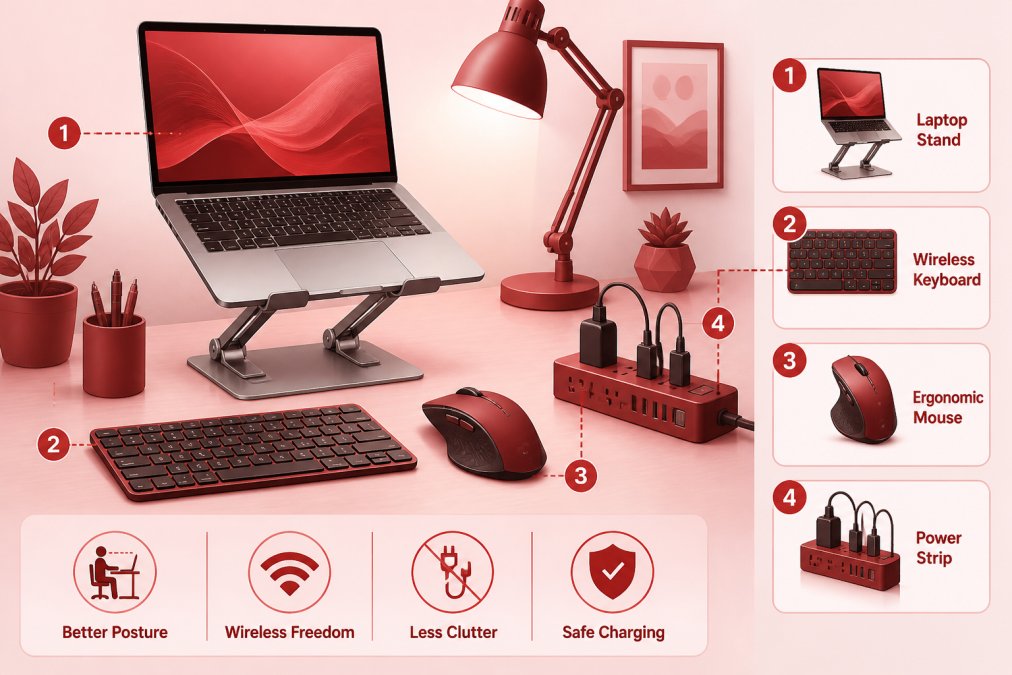
Total accessory investment: under $110 for all four items.


Long-Term Cost of Ownership: What Budget Really Means
"Budget" usually means purchase price. The more useful number is total cost of ownership over the machine's working life.
According to Deel's remote worker IT guide, most modern laptops used for regular remote work last about 4-5 years. A $500 laptop lasting 3 years costs roughly $167 per year. A $700 machine lasting 5 years costs $140 per year and likely avoids one replacement cycle entirely.
| Factor | Impact on Longevity | What to Check |
|---|---|---|
| Chassis durability | High | Military-grade drop testing (MIL-SPEC) |
| RAM upgradeability | High | Soldered vs. DIMM slots |
| Battery replaceability | Medium | User-replaceable vs. sealed |
| Thermal management | Medium | Fan design, vent placement |
| Software support window | Medium | OS update end-of-life date |
The ThinkPad L14 wins on long-term value because its chassis survives years of daily use. Chromebooks carry a different TCO risk: ChromeOS has a defined Auto Update Expiration date, after which the device no longer receives security updates.
Research from Stanford University's remote work productivity study found a 13% performance gain from working at home. The equipment workers use directly affects whether that productivity gain materializes.
Which Budget Laptop Should You Pick?
Choose the Lenovo ThinkPad L14 if: You type heavily, need a machine that survives years of daily use, and want the best keyboard in the sub-$700 category.
Choose the Acer Swift 14 AI if: You want the best overall user experience under $700, prioritize battery longevity, and run standard video conferencing and productivity tools.
Choose the Dell Inspiron 3530 if: Budget is the primary constraint, your workflow is standard office software, and you primarily work at a fixed desk with power access.
Choose a Chromebook if: Your entire workflow runs in a browser, you use Google Workspace, and you want the lowest maintenance, longest battery life option available under $400.
The minimum laptop specs for remote work remain consistent across all four picks: 16 GB RAM, a 256 GB SSD minimum, Full HD display, and a processor from the last three years. Below that floor, the machine will create friction rather than remove it.
The best budget laptops for remote work aren't the ones with the lowest sticker price. They're the ones that hold up long enough to make the per-year cost genuinely competitive.
Remote work demands reliable hardware, and the wrong laptop choice costs more in lost productivity than the price difference between models. TechyDealy carries a curated selection of home office accessories, including the Modulemaster Laptop Stand, Bluetooth keyboard, and wireless mouse, designed to complement any budget laptop setup. With complimentary ground shipping and a hassle-free return policy on every order, you can build your remote work setup with confidence. Shop Smart Essentials at TechyDealy and get your home office working the way it should.
Frequently Asked Questions
What is the best affordable laptop for working from home?
The Acer Swift 14 AI earned the top value pick for working from home in 2026, according to Forbes Vetted's panel testing of 20 models. For most remote roles handling video calls, browser tabs, and Microsoft 365 or Google Workspace, any laptop with an Intel Core i5 (8th Gen or newer) or AMD Ryzen 5, 16GB RAM, and a 512GB SSD will cover daily tasks without bottlenecks. Budget laptops for remote work under $600 can meet all of these thresholds.
How much RAM do I need for a remote work laptop?
16GB of RAM handles the typical remote work stack, video conferencing, multiple browser tabs, spreadsheets, and project management platforms, without slowdowns. If you run virtual machines, heavy design software, or data analysis tools, 32GB is the better target. 8GB is a functional floor for very light use, but it will show strain as applications and browser tabs accumulate. Prioritize 16GB when choosing a budget laptop for remote work if your budget allows.
What type of laptop do I need for remote work?
The right laptop depends on your workload. For standard remote roles, email, video calls, documents, and cloud apps, a mid-range Windows laptop or Chromebook with a Full HD display, backlit keyboard, solid state drive, and USB-C power delivery is sufficient. Developers, designers, and data analysts need more RAM and a faster processor. Battery longevity above 8 hours matters most for workers who move between rooms or co-working spaces throughout the day.
What is the best value laptop for working from home in 2026?
Forbes identified the Acer Swift 14 AI as the best value laptop for working from home in 2026 after side-by-side testing of 20 models. The Lenovo ThinkPad L14 also ranks highly for professionals who prioritize keyboard comfort, chassis durability, and biometric security at a competitive price. Both models hit the recommended baseline specs: Full HD display, 16GB RAM, and a fast solid state drive.
Which laptop accessories make the biggest difference for home office productivity?
A laptop stand is one of the highest-impact accessories, raising screen height reduces neck strain during long sessions and improves posture. Pair it with a wireless mouse and an external keyboard for ergonomic flexibility. A compact power strip with USB ports keeps your desk organized and all devices charged from one point. For video calls, a clip-on lavalier microphone improves audio clarity far beyond most built-in laptop microphones, especially in rooms with echo or background noise.
This article was written using GrandRanker