

Table of Contents
- Why Budget Ergonomics Matter for Remote Workers
- Free and DIY Ergonomic Adjustments You Can Make Today
- How to Arrange Home Office for Posture: The Priority Order
- Ergonomic Desk Chair Under $300: What to Look For
- Essential Peripherals and Accessories for Under $100
- Uninterruptible Power Supply and Cable Management on a Budget
- Budget Ergonomic Setup Comparison: What to Buy First
- Conclusion
Last Updated: August 30, 2026
Why Budget Ergonomics Matter for Remote Workers
According to Pew Research Center's 2020 pandemic study, 71% of people worked from home by December 2020, and millions have stayed there. That means millions of workers now spend 6+ hours daily at home workstations never designed for full-time use.
Poor posture and repetitive strain create cumulative damage: neck pain, lower back issues, wrist problems, and shoulder tension. Yet many remote workers assume a budget ergonomic setup requires thousands of dollars. It doesn't.
Approximately 78% of office workers use computer peripherals daily for more than 6 hours (Ergonomic Mice and Keyboards Market Size, Share), and 31% of American consumers now prefer ergonomic peripherals for home offices. Strategic investments deliver measurable returns. According to the Washington State Department of Labor and Industries, ergonomic interventions reduce workers' compensation costs by 65% and cut lost workdays by 75%. You don't need premium brands to see those benefits, you need the right priorities.
Free and DIY Ergonomic Adjustments You Can Make Today
Before spending a dollar, fix what you already have. Many ergonomic problems stem from misconfigured workstations, not missing equipment.
Start with monitor height. Your eyes should naturally rest at the top third of the screen when sitting upright. Stack books or use a makeshift riser to elevate the screen to eye level, this eliminates one of the most common sources of neck pain.
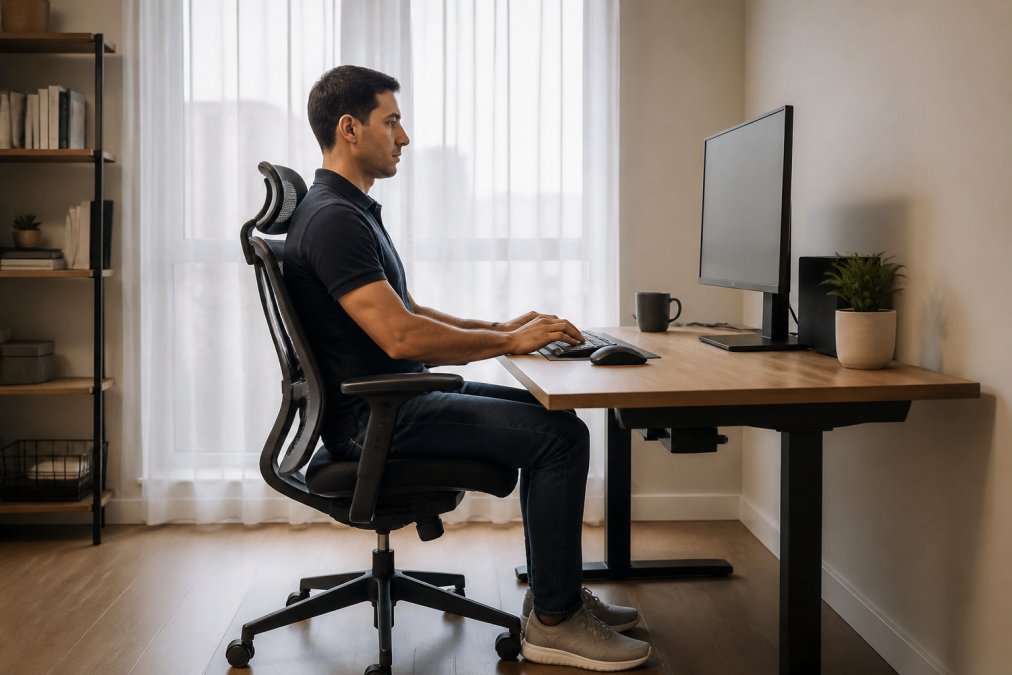
Your elbows should rest at 90 degrees when your hands reach the keyboard. If typing on a laptop, your wrists bend upward, creating repetitive strain injury risk. Use a rolled towel as a wrist rest and position your mouse at keyboard height to keep your arm neutral.
Place a rolled towel at the small of your back for lumbar support. Your feet should rest flat on a surface when knees are at 90 degrees, use a shoebox, books, or milk crate as a footrest. Dangling feet increase thigh pressure and reduce circulation.
Finally, manage cable clutter using clips, ties, or the [Power Bar with USB(https://techydealy.com/products/power-bar-with-usb-flat-plug-extension-cord-with-4-outlets-and-3-usb-ports-5-ft-power-cord-desktop-charging-station-overload-protection-compact-portable-for-travel-home-office-cruise-ship) from TechyDealy | techydealy.com] ($20.09) to consolidate power in one location. These free fixes address 70% of ergonomic complaints.
How to Arrange Home Office for Posture: The Priority Order
When you invest, spend strategically. Not all components deliver equal value.
Priority 1: The Chair
Your chair is where your body makes contact with your workspace for 8+ hours daily. A poor chair undermines every other adjustment; an adequate chair multiplies the benefit of everything else.
Look for adjustable lumbar support, seat depth adjustment, and armrest height control. According to Fortune Business Insights' 2026 Ergonomic Chair Market Analysis, over 50% of professionals working from home invest in ergonomic seating solutions, which improve comfort and productivity by nearly 20%.
Budget allocation: $200-$400 for your first chair investment.
Priority 2: Keyboard and Mouse
A laptop keyboard forces wrists into extension, creating strain. An external keyboard and mouse are non-negotiable for full-time remote work.
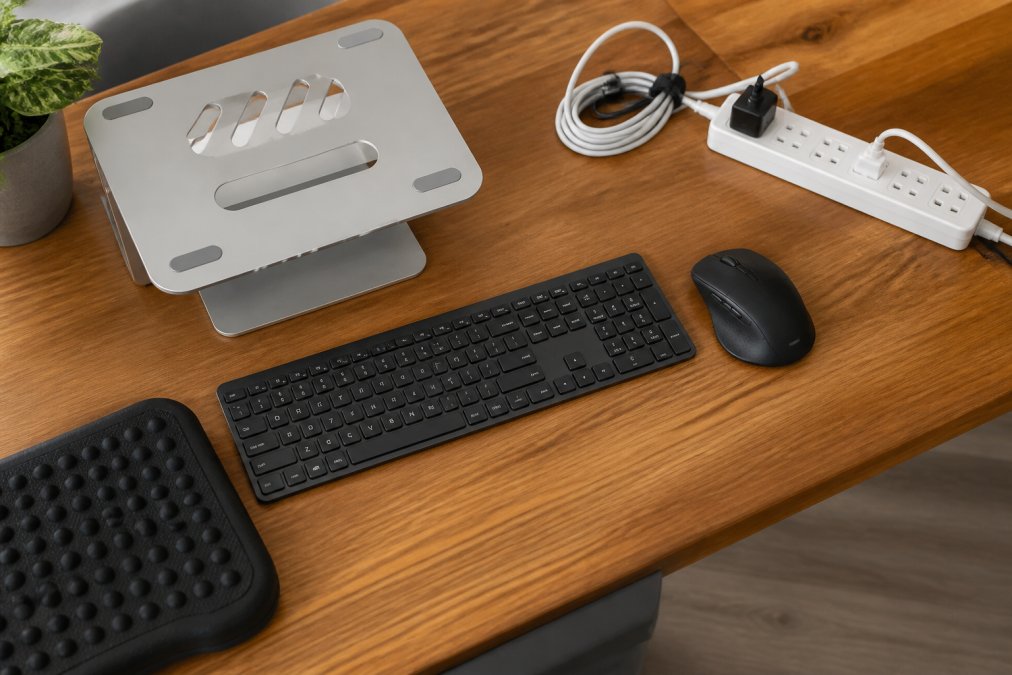
The 2.4G Wireless Mouse with RGB Backlit from TechyDealy ($12.94) offers ergonomic honeycomb design and rechargeable battery. Pair this with the [Portable Foldable(https://techydealy.com/products/portable-foldable-folding-keyboard-mini-wireless-bluetooth-keyboard-touchpad-keyboard-for-windows-android-ios-tablet-ipad-phone) Folding Keyboard from TechyDealy | techydealy.com] ($30.21) for wireless connectivity and compact design. Ergonomic keyboards held 54% of the global market share in 2024, reflecting growing demand for peripherals supporting neutral wrist positioning.

Budget allocation: $40-$80 for keyboard and mouse combined.
Priority 3: Monitor Stand or Laptop Riser
Once you have an external keyboard, your laptop screen needs elevation. The Modulemaster Laptop Stand from TechyDealy ($45.35) provides adjustable height for customizable positioning while reducing neck and eye strain.
Budget allocation: $30-$60 for a laptop stand or monitor riser.
Priority 4: The Desk
The desk ranks last. A standing desk converter is valuable for dynamic sitting but not essential for a functional budget setup. A fixed desk at proper height works fine if your chair is adjustable. More than 9.5 million U.S. offices used standing desks in 2023, but this reflects preference, not necessity.
Budget allocation: $0-$200 (only if your current desk height is problematic).
This priority order is critical. Most remote workers reverse it, buying a fancy desk first, then a cheap chair. That's the fastest way to waste money.
Ergonomic Desk Chair Under $300: What to Look For
An ergonomic desk chair under $300 must deliver on three core features.
Lumbar Support
The lumbar spine curves inward naturally. Your chair must support that curve. Look for adjustable lumbar support that moves up and down to match your lower back. Test by sitting for 30 minutes, if your lower back aches, the support isn't adequate.
Seat Depth and Height Adjustment
Your thighs should rest parallel to the floor with feet flat on the ground. Seat depth matters: too deep digs into your knees; too shallow loses thigh support. Height adjustment is non-negotiable, your elbows should rest at 90 degrees when hands reach your desk.
Armrest Height Control
Arms hanging unsupported create shoulder and neck tension. Armrests should support your forearms at desk height. Look for armrests that adjust up and down.
Essential Peripherals and Accessories for Under $100
After your chair and keyboard, these accessories multiply comfort without major expense.
External Mouse ($10-$30)
An ergonomic mouse keeps your wrist in neutral position. The [2.4G Wireless Mouse(https://techydealy.com/products/2-4g-wireless-mouse-with-rgb-backlit-6-button-3-speed-dpi-type-c-rechargeable-ergonomic-honeycomb-design-gaming-mouse) from TechyDealy | techydealy.com] ($12.94) combines affordability with ergonomic design. Wireless eliminates cable drag.

Wrist Rest ($15-$40)
Gel or memory foam wrist rests support your wrists while typing and prevent wrist extension, reducing strain on the median nerve.
Footrest ($20-$50)
A proper footrest keeps feet flat and knees at 90 degrees, improving circulation and reducing thigh pressure.
Monitor Arm or Stand ($30-$80)
An adjustable arm positions your monitor precisely at eye level, cheaper than replacing a monitor at the wrong height.
Task Lighting ($25-$60)
Poor lighting creates eye strain and encourages forward head posture. A desk lamp with adjustable brightness reduces glare and supports proper posture.
Desk Organizer
The Gold Desk Organizer Set from TechyDealy ($51.02) keeps supplies organized. A clutter-free desk reduces visual stress and supports focus.
Uninterruptible Power Supply and Cable Management on a Budget
Cable chaos creates stress that drains focus and increases tension. The Power Bar with USB from TechyDealy ($20.09) consolidates power and USB charging in one location with 4 AC outlets and 3 USB ports. The flat plug design fits behind furniture without blocking other outlets.
Use clips or cable ties to bundle wires together and route them behind your desk. Cable management accessories cost minimal money but deliver outsized ergonomic and psychological benefits.
A basic uninterruptible power supply (UPS) ($50-$100) provides surge protection and brief backup power during outages, preventing data loss and system shutdown stress.
Budget Ergonomic Setup Comparison: What to Buy First
| Priority | Component | Budget Range | Best Value Pick | Key Feature |
|---|---|---|---|---|
| 1 | Ergonomic Chair | $200-$400 | Branch Ergonomic Chair | Adjustable lumbar support, breathable mesh |
| 2 | External Keyboard | $20-$60 | Portable Foldable Keyboard (TechyDealy) | Wireless, ergonomic layout, $30.21 |
| 3 | Ergonomic Mouse | $10-$40 | 2.4G Wireless Mouse (TechyDealy) | Honeycomb design, rechargeable, $12.94 |
| 4 | Laptop/Monitor Stand | $30-$80 | Modulemaster Laptop Stand (TechyDealy) | Adjustable height, sturdy, $45.35 |
| 5 | Power Strip with USB | $15-$25 | Power Bar with USB (TechyDealy) | 4 outlets, 3 USB ports, $20.09 |
| 6 | Footrest | $20-$50 | Basic Platform Footrest | Adjustable angle, improves circulation |
| 7 | Desk Organizer | $30-$60 | Gold Desk Organizer Set (TechyDealy) | 6-piece set, reduces visual clutter, $51.02 |
| 8 | Task Lighting | $25-$60 | Adjustable LED Desk Lamp | Reduces eye strain, color temperature control |
A $300 chair with a $20 keyboard outperforms a $50 chair with a $300 standing desk. For most remote workers, a complete budget ergonomic setup totals $400-$700, including a functional chair, external keyboard and mouse, laptop stand, power management, and basic accessories.

Workers with higher satisfaction in their home office setup reported higher productivity and lower burnout in a 2024 Maastricht University study of 1,002 Dutch at-home workers. A thoughtful budget setup signals that this work matters, improving focus and reducing stress.
Building a budget ergonomic home office setup doesn't require premium brands or thousands of dollars. It requires strategic priorities and attention to posture fundamentals. Start with a functional chair, add external keyboard and mouse, then layer in accessories supporting neutral positioning.
TechyDealy carries the core components you need at prices that fit a real budget. The Modulemaster Laptop Stand ($45.35), 2.4G Wireless Mouse ($12.94), and Power Bar with USB ($20.09) combine to create a foundation supporting proper ergonomics without premium pricing. Shop these essentials and build the workspace that lets you work comfortably for years to come.
=== FAQ ANSWERS (audit these too, same rules) ===
[1] Q: What is the best budget ergonomic home office setup? A: The best budget ergonomic home office setup prioritizes the components that have the most impact on comfort and health. Start with a supportive chair offering lumbar support and adjustability, then add an external keyboard and mouse to maintain neutral wrist extension. Follow with a laptop riser or monitor stand to achieve eye-level alignment, and use a footrest if needed. Over 50% of remote workers investing in ergonomic seating report improved comfort and nearly 20% productivity gains. Free adjustments, like stacking books under your monitor or using a rolled towel for lumbar support, can bridge gaps while you budget for key pieces.
[2] Q: How can I make my home office ergonomic without spending a fortune? A: Begin with zero-cost fixes: adjust your chair height so your elbows sit at 90 degrees, position your monitor at arm's length away and at eye level using books or boxes, and take five-minute movement breaks every hour to avoid sedentary behavior. Next, invest in a quality external keyboard and ergonomic mouse (around $40-$50 combined) to reduce wrist strain and repetitive strain injury risk. A laptop stand like the Modulemaster at $45.35 elevates your screen without blocking your view. Research shows ergonomic workplaces can increase productivity by up to 10 percent and reduce back pain by 40 percent, making even modest investments worthwhile.
[3] Q: What should I prioritize when buying ergonomic furniture on a budget? A: Prioritize in this order: (1) Chair or chair upgrades, this is where you spend the most time and where poor support causes the most damage; (2) External keyboard and mouse for laptop users to maintain neutral posture; (3) Monitor stand or laptop riser to achieve proper eye-level alignment and cervical spine alignment; (4) Desk, a simple table works fine if other elements are correct. A supportive chair with adjustable lumbar support and seat depth prevents long-term musculoskeletal health issues. Budget ergonomic desk chairs under $300 offer firm support and basic adjustability.
[4] Q: How do I know if my home office setup is actually ergonomic? A: Check these benchmarks: your monitor should be at eye level when you sit upright; your elbows should bend at 90 degrees with your forearms parallel to the floor; your feet should rest flat on the ground or a footrest; your lower back should have lumbar support; and your wrists should remain neutral (not bent up or down) when typing. You should be able to work for six hours without neck, shoulder, or wrist pain. Nearly 78% of office workers use computer peripherals daily for over six hours, making proper workstation configuration essential. If you experience pain after an hour of work, your setup needs adjustment, start with monitor height and chair adjustability before buying new equipment.
Frequently Asked Questions
What is the best budget ergonomic home office setup?
The best budget ergonomic home office setup prioritizes the components that have the most impact on comfort and health. Start with a supportive chair offering lumbar support and adjustability, then add an external keyboard and mouse to maintain neutral wrist extension. Follow with a laptop riser or monitor stand to achieve eye-level alignment, and use a footrest if needed. Over 50% of remote workers investing in ergonomic seating report improved comfort and nearly 20% productivity gains. Free adjustments, like stacking books under your monitor or using a rolled towel for lumbar support, can bridge gaps while you budget for key pieces.
How can I make my home office ergonomic without spending a fortune?
Begin with zero-cost fixes: adjust your chair height so your elbows sit at 90 degrees, position your monitor at arm's length away and at eye level using books or boxes, and take five-minute movement breaks every hour to avoid sedentary behavior. Next, invest in a quality external keyboard and ergonomic mouse (around $40-$50 combined) to reduce wrist strain and repetitive strain injury risk. A laptop stand like the Modulemaster at $45.35 elevates your screen without blocking your view. Research shows ergonomic workplaces can increase productivity by up to 10 percent and reduce back pain by 40 percent, making even modest investments worthwhile.
What should I prioritize when buying ergonomic furniture on a budget?
Prioritize in this order: (1) Chair or chair upgrades, this is where you spend the most time and where poor support causes the most damage; (2) External keyboard and mouse for laptop users to maintain neutral posture; (3) Monitor stand or laptop riser to achieve proper eye-level alignment and cervical spine alignment; (4) Desk, a simple table works fine if other elements are correct. A supportive chair with adjustable lumbar support and seat depth prevents long-term musculoskeletal health issues. Budget ergonomic desk chairs under $300 offer firm support and basic adjustability.
How do I know if my home office setup is actually ergonomic?
Check these benchmarks: your monitor should be at eye level when you sit upright; your elbows should bend at 90 degrees with your forearms parallel to the floor; your feet should rest flat on the ground or a footrest; your lower back should have lumbar support; and your wrists should remain neutral (not bent up or down) when typing. You should be able to work for six hours without neck, shoulder, or wrist pain. Nearly 78% of office workers use computer peripherals daily for over six hours, making proper workstation configuration essential. If you experience pain after an hour of work, your setup needs adjustment, start with monitor height and chair adjustability before buying new equipment.
This article was written using GrandRanker