

Table of Contents
- Why Ergonomic Tools Matter for Your Workspace
- How to Set Up an Ergonomic Home Office
- Best Ergonomic Desk Accessories to Reduce Strain
- Preventing Repetitive Strain Injury at Work
- Technology-Enabled Ergonomics: AI and Wearables
- Budget-Friendly Ergonomic Solutions That Work
- Measuring Your ROI: Productivity Gains from Ergonomic Investment
- Frequently Asked Questions
Last Updated: September 29, 2026
Why Ergonomic Tools Matter for Your Workspace
Improved comfort and productivity with ergonomic tools consumer electronics isn't just a nice-to-have, it's a business decision that directly impacts your bottom line. At TechyDealy, we've tracked how workspace setup affects output, and the numbers are compelling. According to SpeakWise App's Workplace Ergonomics Statistics, ergonomic programs reduce musculoskeletal disorders by 59% and lost workdays by 75%. That's not marginal improvement. That's transformational.
Here's what most guides get wrong: they treat ergonomics as a health issue. It is, but that misses the real story. Ergonomics is a productivity multiplier. When your neck doesn't ache, your wrists don't burn, and your back isn't screaming by 3 p.m., you get more work done. You make fewer mistakes. You stay focused longer. The psychological benefit alone, knowing your workspace supports you instead of fighting you, shifts how you approach your day.
Tech workers especially feel this acutely. You're sitting at a screen for 8-10 hours daily. Small misalignments compound into genuine pain. The good news: the tools to fix this are affordable, accessible, and proven.
How to Set Up an Ergonomic Home Office
The ideal ergonomic home office follows one principle: neutral spine position. Your head should sit directly above your shoulders. Your elbows should rest at 90 degrees. Your feet should be flat on the floor or a footrest. Everything else, monitor height, desk depth, chair adjustment, flows from this.
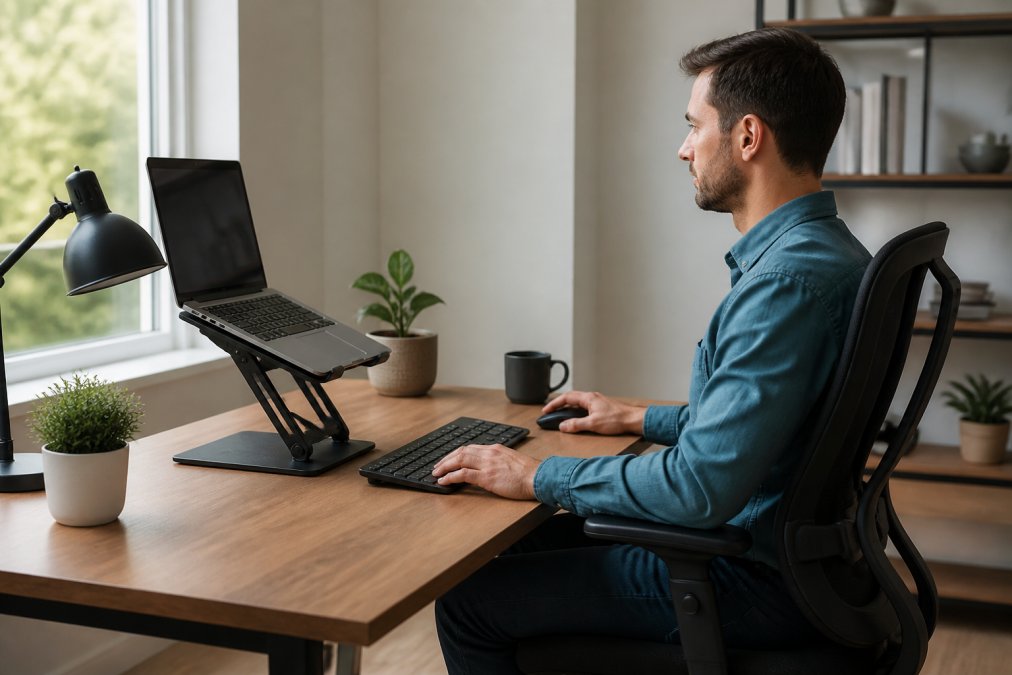
Start with your chair. This is non-negotiable. An adjustable chair that supports your lumbar spine costs between $150-400, but it's the foundation everything else builds on. Your seat should be high enough that your thighs are parallel to the floor when your feet are planted. The backrest should support the natural curve of your spine, not force you into an artificial position.
Next, position your monitor at eye level. If you're using a laptop, this is where the Modulemaster Laptop Stand ($45.35) becomes essential. Elevating your screen reduces neck strain dramatically. Your eyes should naturally gaze slightly downward at the screen center, not upward or severely downward. This single adjustment prevents tech neck, that forward head posture that leads to chronic shoulder and neck tension.

Your keyboard and mouse should sit at elbow height on a surface about 28-30 inches high. If your desk is standard height but your chair is adjusted for proper posture, use a keyboard tray to drop the input surface. Here's the critical part: don't use your laptop keyboard for extended work. The ergonomic mouse from TechyDealy, the 2.4G Wireless Mouse with RGB Backlit 6-Button design at $12.94, is designed with contoured ergonomic honeycomb construction that reduces palm pressure and makes control more comfortable and natural.
For keyboard work, the Portable Foldable Folding Keyboard ($30.21) offers flexibility if you need to shift positions or work from multiple locations. Its 81-key layout and Bluetooth connectivity let you maintain proper wrist alignment without tethering yourself to one desk configuration.
Best Ergonomic Desk Accessories to Reduce Strain
The right ergonomic tools consumer electronics accessories multiply the benefit of a properly positioned workstation. They're the difference between discomfort that's "manageable" and genuine relief.
Neck and shoulder tension builds quickly during focused work. The Heated Neck & Spine Massager ($70.99) from TechyDealy combines four dynamic massage heads with vibration therapy and heat to target the exact areas that suffer most. The device includes breathing light effects that calm your nervous system, a feature that matters more than it sounds. Tension isn't purely physical. The psychological relief of knowing you can address soreness immediately reduces stress throughout your day.

Cable management and power access matter more than people realize. A cluttered desk creates psychological friction. You're constantly aware of the mess, even subconsciously. The Power Bar with USB ($20.09) consolidates 4 AC outlets and 3 USB ports into a single compact unit, eliminating cable sprawl. It fits on your desk, table, or nightstand without dominating space. The flat-plug design means it doesn't block adjacent outlets behind furniture.
Workspace organization completes the ergonomic picture. The Gold Desk Organizer Set ($51.02) keeps your workspace clean and reduces reaching and stretching for frequently used items. When everything has a designated place, you move less and stay more centered at your desk. This reduces strain from repetitive reaching motions, a primary cause of repetitive strain injury.
For audio work or video calls, the LED Display Noise-Canceling Bluetooth Earbuds ($17.99) let you listen without headband pressure on your temples or ears. The lightweight ergonomic design and active noise-canceling mean you're not turning up volume to compensate for background noise, which reduces ear fatigue during long sessions.
| Accessory | Price | Primary Benefit | Best For |
|---|---|---|---|
| Modulemaster Laptop Stand | $45.35 | Reduces neck and eye strain | Laptop-based work |
| Ergonomic Wireless Mouse | $12.94 | Reduces wrist and palm pressure | All-day computer use |
| Heated Neck Massager | $70.99 | Relieves muscle tension and fatigue | High-stress periods |
| Power Bar with USB | $20.09 | Reduces cable clutter and reaching | Desk organization |
| Gold Desk Organizer | $51.02 | Minimizes repetitive reaching | Frequent item access |
Preventing Repetitive Strain Injury at Work
Repetitive strain injury (RSI) and musculoskeletal disorders develop gradually. You don't wake up with carpal tunnel syndrome. It builds from months of poor positioning, excessive force, or sustained tension. The prevention window is wide, but it closes if you ignore early warning signs.
RSI manifests in predictable patterns. Carpal tunnel affects the median nerve in your wrist. Cubital tunnel targets the ulnar nerve at your elbow. Tech neck, that forward head posture, creates tension in your cervical spine. These aren't separate problems. They're all expressions of the same root cause: positioning that forces your body into unnatural alignment for hours daily.
The fix is layered. First, optimize positioning as described above. Second, take movement breaks. Every 30 minutes, stand, stretch, and reset your posture. Third, use tools that reduce biomechanical load. Research from PMC National Library of Medicine's Technology-Driven Ergonomics review analyzed 74 studies and confirmed that technology-enabled ergonomic systems substantially reduce biomechanical load and improve outcomes.
Prevention is cheaper than recovery. Treating RSI requires physical therapy, sometimes surgery, and months of reduced productivity. A $100 ergonomic setup investment prevents thousands in medical costs and lost time.
Technology-Enabled Ergonomics: AI and Wearables
Tech-integrated ergonomic accessories saw an 18% adoption increase in Q3 2026 alone, according to Sunaofe's Ergonomic Workstation Calibration Guide. This acceleration reflects genuine value, not hype. Wearables and AI systems monitor posture in real time. They don't judge. They simply alert you when you've drifted into a problematic position, letting you correct before strain accumulates.
The Portable Fan Air Conditioners ($54.99) from TechyDealy represents a different angle on tech-enabled comfort. Environmental factors matter. If your workspace is too warm, you fidget and shift positions constantly. The 3-in-1 design, fan, humidifier, and LED light, maintains the microclimate around your desk. Comfortable temperature and humidity reduce unconscious postural adjustments that lead to strain.
Budget-Friendly Ergonomic Solutions That Work
You don't need to spend $2,000 on a complete ergonomic overhaul. Strategic investments in the right items deliver 80% of the benefit at 20% of the cost.
Start with the essentials: external keyboard ($30), ergonomic mouse ($13), and laptop stand ($45). Total: $88. This combination eliminates the three worst ergonomic offenders for laptop users, hunched shoulders, bent wrists, and downward neck gaze. The improvement is immediate and measurable.

Next tier: add an adjustable desk or keyboard tray ($100-200). This gives you flexibility to change positions throughout the day. Sedentary behavior is the enemy. The ability to alternate between sitting and standing, or simply adjust your sitting height, prevents the cumulative strain that builds from static positioning.
Third tier: invest in recovery tools. The Heated Neck & Spine Massager ($70.99) addresses existing tension.
Measuring Your ROI: Productivity Gains from Ergonomic Investment
The return on ergonomic investment is real but indirect. You're not measuring units produced. You're measuring pain reduction, focus duration, and error rates.
Frequently Asked Questions
What are the most essential ergonomic tools for a home office?
The foundation includes a laptop stand to position your screen at eye level, an external keyboard and ergonomic mouse to keep wrists neutral, and a chair with lumbar support. The Modulemaster Laptop Stand ($45.35) elevates your screen to reduce neck strain, while a wireless ergonomic mouse like the 2.4G model ($12.94) fits your hand's contour to minimize pressure on your palm.
How can ergonomic tools for consumer electronics directly impact daily productivity?
When your workspace supports neutral posture and reduces physical strain, you spend less energy fighting discomfort and more energy on actual work. Reduced muscle fatigue means fewer breaks, sharper focus, and fewer mistakes, all measurable gains in output.
What signs indicate my current workspace setup is causing strain?
Watch for neck pain, shoulder tension, wrist discomfort, or lower back aches that worsen during work hours. Tech neck (forward head posture), tingling in fingers (potential carpal tunnel warning), and eye strain are red flags. If you're shifting position constantly or taking frequent breaks to stretch, your setup needs adjustment. Repetitive strain injury develops gradually, so catching these early signals and investing in ergonomic tools now prevents costly injuries later.
Can I improve my ergonomic setup on a budget?
Yes. Start with high-impact, low-cost items: a laptop stand (like the Modulemaster at $45.35) lifts your screen without breaking the bank, and a budget ergonomic mouse ($12.94) reduces wrist pressure. Proper desk height and chair adjustment cost nothing. A portable foldable keyboard ($30.21) adds flexibility for multiple work locations. Combine these with free posture awareness and regular movement breaks.
Ergonomic setup transforms how you work. The tools exist. The research confirms the benefit. The only question is when you'll start. TechyDealy's curated selection of ergonomic solutions, from the Modulemaster Laptop Stand to the Heated Neck & Spine Massager, makes implementation straightforward. Shop Smart Essentials today and experience the difference proper ergonomic support delivers to your comfort and productivity.