

Table of Contents
- What an Uninterruptible Power Supply Does for Your Setup
- UPS Battery Backup Runtime: How Long You Actually Get
- UPS vs Surge Protector: What Each One Protects
- Standby, Line-Interactive, and Double-Conversion UPS Topologies
- How to Choose a UPS for Home Office Work
- Cost of Ownership and Battery Recycling for an Uninterruptible Power Supply
- Frequently Asked Questions
Last Updated: September 13, 2026
What an Uninterruptible Power Supply Does for Your Setup
An uninterruptible power supply is a device that sits between your wall outlet and your equipment, supplying battery power the instant grid electricity fails or fluctuates. According to Mordor Intelligence's 2026 UPS market report, the global uninterruptible power supply market is valued at USD 12.81 billion in 2026, projected to reach USD 15.72 billion by 2031. That growth tracks a simple reality: downtime costs more than protection does.
At TechyDealy, we hear the same story from remote workers every week. A brownout corrupts a design file. A blackout kills three hours of unsaved work. A power surge takes out a router and a monitor in the same second.
Here's what most buyers get wrong: they treat an uninterruptible power supply as a bigger surge protector. It isn't. A surge protector deflects a spike and does nothing when the grid goes dark. An uninterruptible power supply keeps your machine alive, then gives it time to shut down cleanly.
The difference matters most for anyone running a home office, a gaming rig, or a small server. Below, we break down runtime expectations, topology choices, and what ownership actually costs over five years.
UPS Battery Backup Runtime: How Long You Actually Get
Runtime is the number buyers fixate on and the one most often misunderstood. A typical consumer uninterruptible power supply delivers 5 to 15 minutes at full load, enough to save files and shut down safely. Extended runtime requires either a larger unit or an external battery pack.
The math is unforgiving: runtime scales inversely with load. Cut your connected load in half and runtime roughly doubles. That's why the same unit can run a router for two hours or a gaming PC for six minutes.
A 2026 ZincFive industry survey found that 41% of data center respondents expect their UPS battery backup runtime to increase, a 12% rise over previous reporting. That expectation hasn't reached home offices yet, where most users still buy on wattage alone.
Practical targets for a home setup:
- Router and modem only: 60-120 minutes on a small unit
- Laptop plus monitor: 20-40 minutes
- Full desktop with GPU under load: 5-10 minutes
UPS vs Surge Protector: What Each One Protects
A surge protector and an uninterruptible power supply solve two different problems, and conflating them is the most common mistake in home power protection. A surge protector clamps voltage spikes and diverts excess energy to ground. An uninterruptible power supply does that plus provides battery backup, voltage regulation, and clean sine wave output.
| Feature | Surge Protector | Uninterruptible Power Supply |
|---|---|---|
| Blocks voltage spikes | Yes | Yes |
| Runs equipment during outage | No | Yes |
| Automatic voltage regulation | No | On line-interactive and online models |
| Clean sine wave output | No | On most modern units |
| Typical cost | $20-$50 | $70-$300+ |
Surge protectors are cheap insurance for low-value electronics. An uninterruptible power supply is required when losing power mid-task costs you money, data, or hardware.
Testing from The New York Times Wirecutter's 2026 UPS review identified the CyberPower LE1000DG as a top performer for home and office setups, capable of running essential equipment for up to three hours at light load. That's the practical ceiling for a consumer unit: three hours of router, not three hours of workstation.
For a full breakdown of outlet-level protection, our team at TechyDealy carries a Power Bar with USB and 4 Outlets at $20.09, which handles overload protection for peripherals while your uninterruptible power supply covers the critical load.

Standby, Line-Interactive, and Double-Conversion UPS Topologies
Topology determines how your uninterruptible power supply handles everyday voltage fluctuation, and it's the spec most buyers skip. Three designs dominate the market, and each suits a different load profile. The differences show up in transfer time, voltage regulation, efficiency, and heat output, all of which affect what you can safely plug in.
Standby UPS: The cheapest design. It passes utility power straight through and switches to battery only when voltage drops. Transfer time runs 6-10 milliseconds, and there's no voltage regulation. Standby units are typically 95-98% efficient in normal operation because they do almost nothing until the grid fails. Fine for a router, a modem, or a single desktop that tolerates a brief gap. They are a poor fit for equipment with sensitive switch-mode power supplies or any device that reboots on a 10ms interruption.
Line-interactive UPS: Adds automatic voltage regulation (AVR), so it corrects brownouts and overvoltage without draining the battery. Transfer time stays in the 2-6 millisecond range. Efficiency runs 90-96% depending on the unit. This is the right pick for most home offices because AVR handles the most common grid problem, sustained low voltage, without cycling the battery. A line-interactive unit will ride through a brownout that would drain a standby unit's battery in minutes.
Double-conversion (online) UPS: The load runs on inverter power at all times, so transfer time is effectively zero. Output is a pure sine wave with tight voltage tolerance, typically ±1-2%. The trade-off is efficiency: online units run 85-92% because power is converted twice (AC to DC to AC), and that lost energy becomes heat. They cost more, run hotter, and suit servers, medical equipment, lab gear, and any load that cannot tolerate even a 2ms gap. For a home office, the extra cost and heat are rarely justified unless you run a NAS with strict uptime requirements or sensitive audio interfaces.
Modular designs are reshaping the higher end. According to Fortune Business Insights' modular UPS market forecast, the global modular uninterruptible power supply market is valued at USD 2.00 billion in 2026, with forecasts projecting USD 4.05 billion. Modular units let you add power modules as load grows rather than replacing the whole system, and they often support hot-swappable batteries so you can replace a failed string without taking the load offline.
A fourth category worth knowing: hybrid or multi-mode UPS. These run in double-conversion mode when power quality is poor and switch to line-interactive or eco mode when the grid is clean, capturing most of the efficiency of line-interactive with most of the protection of online. They cost more than line-interactive but less than full online, and they are increasingly common in small data centers and edge closets.
For smart home and IoT setups, topology matters less than the management interface. Some line-interactive and online units expose battery status, load level, and runtime estimates through a USB or network card, which lets a home automation hub trigger an automated shutdown before the battery drains. If your setup already runs on scheduled routines and smart plugs, look for a UPS with a documented API or native integration rather than relying on a proprietary app that may not be updated.
How to Choose a UPS for Home Office Work
Sizing an uninterruptible power supply for a home office comes down to three numbers: total wattage, required runtime, and acceptable transfer time. Get those right and the model choice becomes obvious.
Start by adding up the wattage on the equipment nameplates. A typical home office setup runs 200-400 watts: desktop at 150-250W, monitor at 30-50W, router at 10-20W, modem at 10W. Multiply by 1.3 for headroom, then match that figure against the unit's wattage rating, not its VA rating. VA and wattage diverge because of power factor, and wattage is the number that matters.
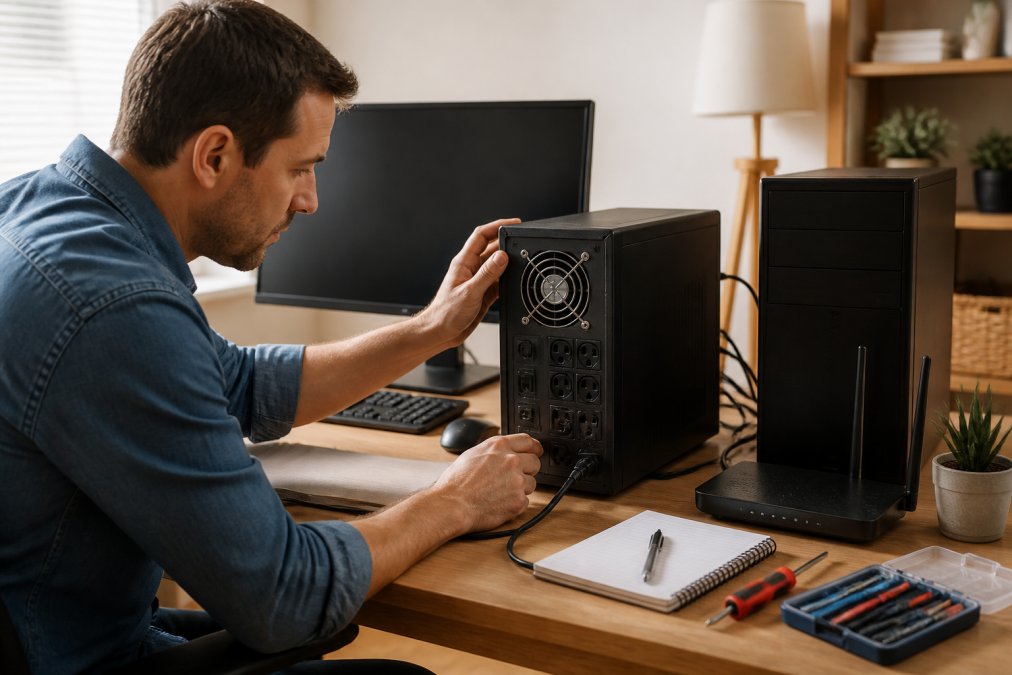
For runtime, decide what you actually need. Saving a document takes 30 seconds. Finishing a video call takes 15 minutes. Riding out a two-hour outage takes a much larger investment.
Use this decision framework:
- Under 300W load, 10 minutes needed: a 600-800VA line-interactive unit
- 300-600W load, 15-30 minutes needed: a 1000-1500VA line-interactive unit
- Over 600W or any server gear: a double-conversion unit with expandable battery
Check the transfer time spec if you run a desktop. Most switch-mode power supplies tolerate a 10ms gap, but sensitive audio interfaces and some NAS units do not.
A common mistake is buying on VA alone. A 1500VA unit rated at 900W will trip its overload protection the moment your GPU spikes if you've loaded it past that wattage ceiling.
Cost of Ownership and Battery Recycling for an Uninterruptible Power Supply
The purchase price is roughly half the story. An uninterruptible power supply carries a five-year cost of ownership that most buyers never calculate, and battery replacement is the biggest line item. Running the numbers before you buy often changes which unit you should choose.
Sealed lead-acid (SLA) batteries, the standard in consumer units, last three to five years under normal conditions. Heat shortens that dramatically: a common rule of thumb is that every 10°C rise above 25°C cuts battery life in half. A unit running in a 30°C closet may need a new battery in two years instead of four. Replacement batteries for a 1000VA unit typically run $40-$80, versus $150-$250 for a new unit. Over five years, a $120 line-interactive unit with one $60 replacement costs about $180 total, roughly $36 per year.
Lithium-iron-phosphate (LiFePO4) batteries cost more upfront but last eight to ten years and tolerate heat better. A LiFePO4 unit might cost $250-$400, but if it avoids two SLA replacements and survives a hot closet, the five-year cost can land close to or below the SLA path. For a unit you plan to keep through multiple battery cycles, the math often favors lithium despite the higher sticker price. The trade-off is that LiFePO4 units are less common at the consumer end, and replacement batteries can be harder to source.
Here's a five-year comparison for a typical 1000VA home office unit:
| Cost Category | SLA Unit | LiFePO4 Unit |
|---|---|---|
| Purchase price | $120-$180 | $250-$400 |
| Battery replacements (5 yr) | 1-2 at $40-$80 each | 0 |
| Estimated 5-year total | $160-$340 | $250-$400 |
| Annualized cost | $32-$68 | $50-$80 |
The SLA unit usually wins on pure five-year cost, but the LiFePO4 unit wins on convenience, heat tolerance, and fewer disposal events. If your UPS lives in a hot garage or closet, the SLA math gets worse fast and lithium becomes the better bet.
Recycling matters here. Lead-acid batteries are classified as hazardous waste in most states and cannot go in curbside bins. Retailers that sell batteries are generally required to accept them for recycling, and municipal household hazardous waste facilities accept them year-round. Call ahead before hauling a 15-pound battery to a drop-off site, some facilities limit how many batteries they accept per visit, and some require the battery to be taped at the terminals to prevent short circuits. Lithium-ion and LiFePO4 batteries have different recycling streams; not all municipal facilities accept them, so check with the manufacturer or a dedicated battery recycler.
The environmental angle is real but often overstated. A single SLA battery contains several pounds of lead and electrolyte that must be kept out of landfills. The good news is that lead-acid recycling is one of the most mature recycling streams in the country, with high recovery rates for the lead and plastic. The practical takeaway: buy a unit you will keep, replace the battery rather than the whole unit when possible, and recycle the old battery at a retailer or municipal facility instead of storing it in the garage indefinitely.
For smart home integration, some newer uninterruptible power supply models expose battery status through a USB or network interface, letting you trigger automated shutdown scripts through your home automation hub. That's the feature to look for if your setup already runs on smart plugs and scheduled routines. A UPS that can tell your hub "battery at 20%" is worth more than one that just beeps.
Pairing a UPS with a portable charging solution covers the gap when you're away from the desk. TechyDealy stocks a Wireless Charging Station with 5 Power Banks at $143.94, which keeps phones and tablets charged during an outage while your uninterruptible power supply handles the workstation.

Frequently Asked Questions
What does an uninterruptible power supply actually do?
An uninterruptible power supply keeps your equipment running when the grid fails and conditions the power while it is live. It contains a rechargeable battery and an inverter that switches on within milliseconds of a blackout, brownout, or voltage fluctuation. Most home units give you enough runtime to save files and shut down cleanly, while larger models support longer sessions. The global uninterruptible power supply market is valued at USD 12.81 billion in 2026 and is projected to reach USD 15.72 billion by 2031 (Mordor Intelligence, 2026).
How long does UPS battery backup runtime last during an outage?
Runtime depends on load capacity, not the box size alone. A 1000VA unit running only a router and modem can hold for hours, while the same unit powering a gaming PC and monitor may last 10 to 15 minutes. A 2026 ZincFive survey found 41% of data center respondents expect their UPS battery backup run time to increase, up 12% from prior reporting. For home office use, size the battery for the devices you cannot afford to lose, not everything on the desk.
Is a surge protector the same as an uninterruptible power supply?
No. A surge protector only diverts excess voltage away from your devices during a spike. It has no battery and does nothing during a blackout. A UPS vs surge protector comparison usually ends with the same recommendation: use both. Plug the UPS into a wall outlet, then plug critical equipment into the UPS. The surge protector handles spikes on non-critical gear like printers and lamps, while the uninterruptible power supply handles outages and brownouts.
How do I calculate the UPS capacity I need for my PC?
Add the wattage of every device you plan to connect, then leave 30% headroom. A typical home office load runs 200 to 400 watts. Check the VA and wattage ratings on the UPS label, since volt-ampere (VA) and watts are not the same number. Most manufacturers publish a runtime chart showing minutes at 100W, 200W, and 400W loads. If your total sits near the top of a unit's rating, step up to the next tier so the battery is not stressed.