

Table of Contents
- Why Ergonomic Office Chairs Matter for Remote Workers
- Quick Comparison: Top Ergonomic Chairs at a Glance
- Best Office Chair for Back Pain Relief
- How to Adjust Office Chair Height for Proper Posture
- Key Ergonomic Features to Look For
- How to Set Up an Ergonomic Home Office
- Long-Term Maintenance and Durability
- Conclusion
Last Updated: August 25, 2026
More than 30% of remote workers report experiencing back pain related to prolonged sitting (wa.gov). The solution is ergonomic. The right office chair can mean the difference between an eight-hour workday that leaves you pain-free and one that leaves you reaching for ibuprofen.
The best ergonomic office chairs for remote work depend on your body type, budget, and how many hours you spend sitting. At TechyDealy, we've analyzed the market data and tested what actually works for remote workers who refuse to compromise on comfort or productivity.
The U.S. ergonomic chair market generated $1,661.6 million in 2022 and is projected to reach $2,622.1 million by 2030, growing at a compound annual growth rate of 5.9%. This growth reflects a hard truth: remote workers are finally investing in their health. Over 70% of organizations now provide ergonomic seating solutions to employees, and adjustable lumbar support and dynamic seating features improve user comfort by nearly 30%.
Below, we'll show you exactly how to find the right chair for your setup, what features actually matter, and how to maintain it for years of pain-free work.
Quick Comparison: Top Ergonomic Chairs at a Glance
| Chair Type | Best For | Key Feature | Typical Price Range |
|---|---|---|---|
| Premium adjustable task chair | All-day remote workers | 4D armrests, lumbar support | $400-$1,200 |
| Mid-range ergonomic chair | Budget-conscious professionals | Adjustable height, mesh back | $200-$500 |
| Gaming-style ergonomic chair | Extended sitting sessions | High recline, neck support | $250-$800 |
| Compact ergonomic chair | Small home offices | Space-saving design | $150-$400 |
Why Ergonomic Office Chairs Matter for Remote Workers
Poor seating damage happens slowly. After months of sitting in an unsupported chair, your spine begins to protest. Research from Washington State Department of Labor and Industries found that organizations investing in ergonomic equipment saw a median 56% decrease in musculoskeletal disorders, 70% reduction in worker's compensation claims, and 80% fewer lost work days.
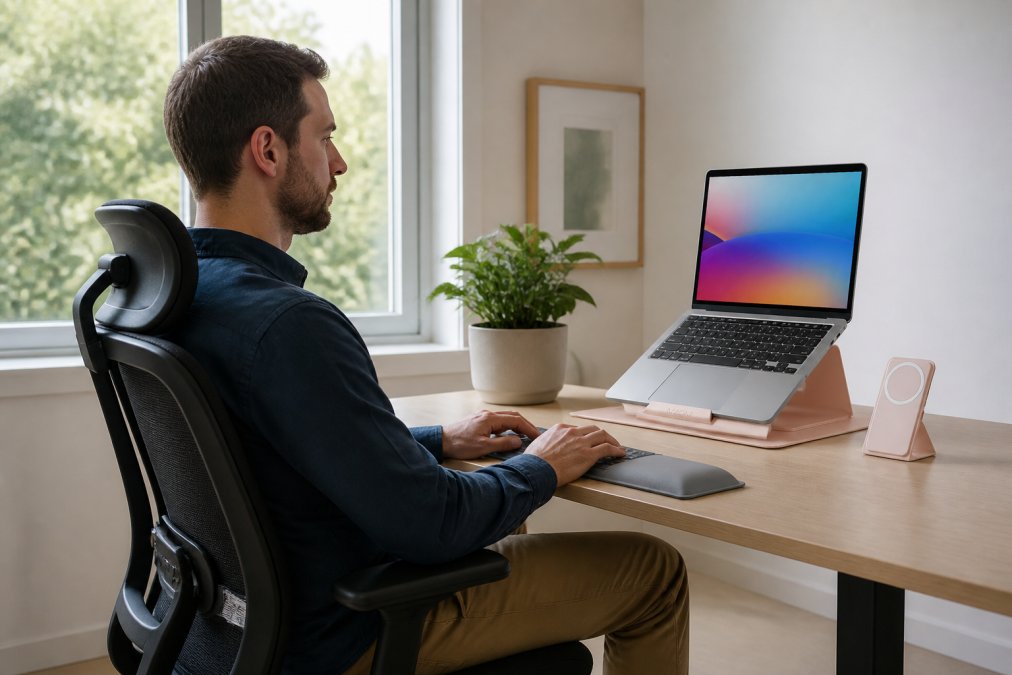
According to Harvard Business Review's workplace well-being research, companies investing in ergonomic seating see higher employee satisfaction, lower turnover, and measurably better productivity. For remote workers, this translates to fewer sick days, better focus, and the ability to enjoy your work instead of enduring it.
What separates a genuinely ergonomic chair from marketing hype? Adjustability. A chair that forces you into a single position will fail you eventually. Your body changes throughout the day. A good ergonomic chair adapts.
Over 45% of companies introduced ergonomic furniture upgrades as part of hybrid-work adaptations in 2024. The residential segment now accounts for 57.7% of the ergonomic chair market share, driven by remote workers who finally have control over their own setups.
Best Office Chair for Back Pain Relief
If your back hurts by 3 p.m., your chair is lying to you about being ergonomic. True back pain relief comes from lumbar support that matches your spine's natural curve, not a generic cushion that flattens after a week.
The ideal chair for back pain includes three non-negotiable features: adjustable lumbar support that moves up, down, forward, and backward; a seat depth that doesn't cut off circulation behind your knees; and a firm seat pan that supports your weight without sagging. Adjustable lumbar support and dynamic seating features improve user comfort by nearly 30%.
For remote workers, the combination of proper lumbar support with a quality mesh backrest creates an environment where your back actually relaxes instead of tensing up. The cost difference between a chair with genuinely adjustable lumbar support and one with a fake "lumbar support" label is typically $150-$300, and it's worth every penny if you spend more than four hours a day sitting.
How to Adjust Office Chair Height for Proper Posture
Most remote workers set their chair height once during setup and assume they're done. The result is a slow slide into poor posture.
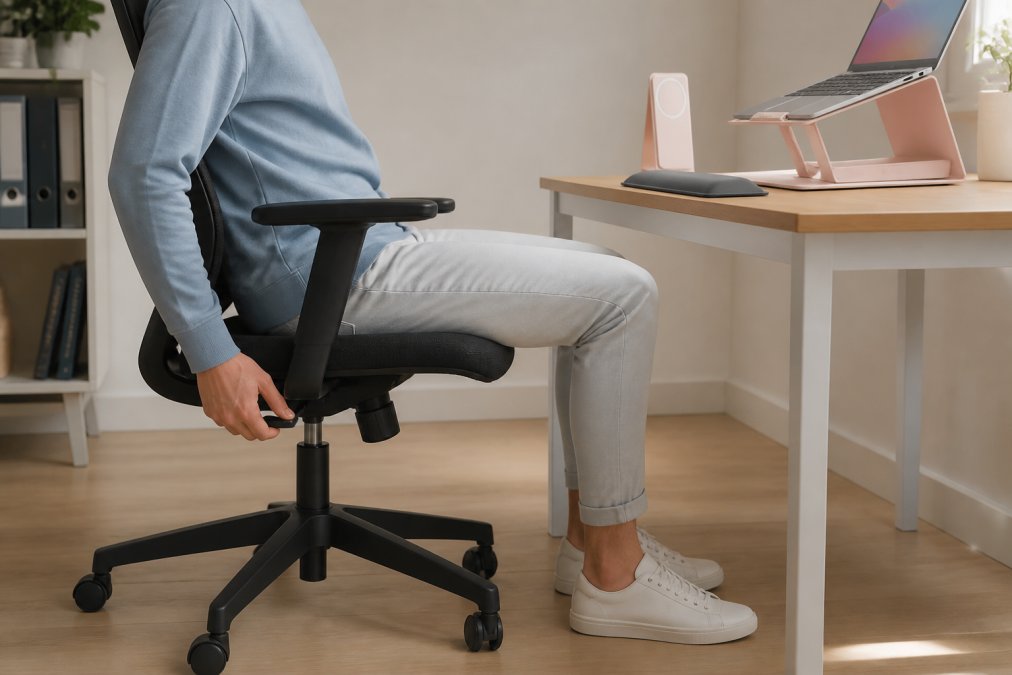
The correct chair height follows a simple rule: your feet should rest flat on the floor, your knees should bend at 90 degrees, and your elbows should align with your desk surface when your arms hang naturally at your sides. If your feet dangle, your chair is too high. If your knees point upward, it's too low.
Sit all the way back in the chair. Adjust the pneumatic height adjustment until your thighs are parallel to the floor. Your hips should be slightly higher than your knees, angling your pelvis forward and reducing pressure on your lower back. Once your height is set, adjust for alignment, not comfort. Comfort comes after alignment is correct.
Your seat pan should support your thighs without pressing into the back of your knees. There should be about two fingers' width of space between the edge of the seat and your knee. If your seat is too deep, you're forced to sit forward, defeating the chair's lumbar support. If it's too shallow, you lose thigh support.
Key Ergonomic Features to Look For
Not all ergonomic features are created equal. Here's what actually changes your experience.
Adjustable lumbar support is non-negotiable. Look for chairs where you can move the lumbar support up, down, forward, and backward. A fixed lumbar support that doesn't match your spine's curve is worse than no lumbar support at all.
4D armrests (height, width, depth, and angle) matter if you spend significant time typing or mousing. Your armrests should support your forearms at the exact height of your desk, allowing your shoulders to relax. Most chairs have fixed armrests or only height adjustment. The best ergonomic chairs for remote work include full 4D adjustment.
Mesh backrest versus foam is a practical choice. Mesh breathes better during long sessions and doesn't retain heat, making it ideal for eight-hour workdays. Foam is more supportive initially but compresses over time. For remote work, mesh wins unless you specifically run cold.
Synchro-tilt mechanism allows the seat and backrest to recline together in proportion, maintaining your posture as you lean back. A standard tilt mechanism lets the backrest move independently, which can throw off your spine alignment. Synchro-tilt is standard on quality ergonomic chairs.
Headrest is underrated for remote workers. Video calls and screen time create neck strain that a good headrest prevents. If you're on calls more than two hours daily, a headrest should factor into your decision.
Weight capacity matters more than you think. A chair rated for 250 pounds will start sagging at 240 pounds. Look for a chair rated at least 50 pounds above your body weight to ensure the chair maintains its support over years of use.
Base stability and caster wheels prevent the chair from rolling when you don't want it to. A five-point base is standard and stable. Caster wheels should roll smoothly on your floor type.
The residential segment is projected to contribute 57.7% of the ergonomic chair market in 2026, largely because remote workers now prioritize these features based on personal experience.
How to Set Up an Ergonomic Home Office
A great ergonomic chair in a terrible setup becomes useless. The chair is one piece of a system. Get the rest wrong and you've wasted your investment.
Monitor height and distance set the foundation. Your monitor should be at eye level when you sit upright, positioned about an arm's length away (20-26 inches). If you're looking down at your screen, your neck bears extra load all day. Eye level is non-negotiable.
Most remote workers need a monitor stand or laptop stand to achieve proper height. The Modulemaster Laptop Stand ($45.35 at TechyDealy) provides adjustable elevation that reduces neck and eye strain during long work sessions.

Keyboard and mouse placement should allow your elbows to bend at 90 degrees with your wrists neutral. Your keyboard should sit at elbow height. A wireless mouse like the 2.4G Wireless Mouse with RGB Backlit ($12.94 at TechyDealy) with ergonomic honeycomb design reduces palm pressure and supports more comfortable control during extended use.
Desk height determines everything else. Standard desk height is 29-30 inches. If you're significantly taller or shorter than average, an adjustable desk becomes essential. Position your keyboard so your forearms are parallel to the floor when your elbows rest at your sides.
Lighting prevents eye strain. Position your monitor perpendicular to windows to avoid glare. Use task lighting to illuminate your work surface without creating harsh shadows. Poor lighting causes you to hunch forward trying to see better, which creates back pain.
Cable management forces you into awkward positions if neglected. A Power Bar with USB ($20.09 at TechyDealy) with overload protection and compact design keeps your charging station organized, eliminating cable chaos and freeing up floor space.
Long-Term Maintenance and Durability
An ergonomic chair is a five-to-ten-year investment. How you maintain it determines whether it delivers on that timeline.
Cleaning and care extend chair life dramatically. Mesh backrests collect dust and dead skin cells, reducing breathability. Vacuum your chair monthly using an upholstery attachment. For stains on fabric, use a mild soap solution and soft brush. For mesh, a damp microfiber cloth works best.
Pneumatic cylinder maintenance keeps your chair adjusting smoothly. If your chair won't hold its height after a few years, the pneumatic cylinder is failing. This is a $30-$80 replacement part on most quality chairs, far cheaper than replacing the entire chair.
Armrest durability depends on how much force you apply. Use them for support, not as handles to pull yourself up. Loose armrests can usually be tightened with an Allen wrench.
Base and caster inspection should happen annually. Casters wear out and stop rolling smoothly. Replacement casters cost $5-$15 each and take five minutes to swap. A wobbly base usually means a loose bolt at the base-to-cylinder connection.
Fabric and foam degradation is inevitable but manageable. Mesh typically lasts longer than fabric because it doesn't compress. Once foam compression becomes noticeable (usually after five to seven years), a seat cushion replacement ($40-$100) restores comfort without replacing the entire chair.
The average home office ergonomic chair investment increased from $450 in 2019 to $890 by 2025, reflecting growing recognition that extended sedentary periods require premium seating solutions.
Choosing the best ergonomic office chairs for remote work means prioritizing your actual body over marketing claims. The right chair reduces back pain, improves focus, and pays for itself through fewer sick days and better productivity. At TechyDealy, we're committed to helping you build a workspace that supports your health and performance with complimentary ground shipping and hassle-free returns on every order. Start with a quality ergonomic chair, add proper desk setup, and maintain it consistently. Your back will thank you for years to come.
=== FAQ ANSWERS (audit these too, same rules) ===
[1] Q: What is the best ergonomic office chair for work-from-home? A: The best ergonomic office chair depends on your body type, budget, and specific pain points. Look for chairs with adjustable lumbar support, 4D armrests, breathable mesh backrests, and a weight capacity that matches your needs. A quality ergonomic chair typically costs $400-$1,200. Research shows that chairs with proper lumbar support and dynamic seating features improve user comfort by nearly 30%, making them a worthwhile investment for remote workers.
[2] Q: How do I adjust my office chair for proper posture? A: Start by setting your chair height so your feet rest flat on the floor with knees at 90 degrees. Your thighs should be parallel to the ground. Adjust the lumbar support to fit the curve of your lower back. Position armrests so your elbows bend at 90 degrees when typing. The monitor should be at eye level, about an arm's length away. Tilt tension should allow slight movement without feeling too loose. Take breaks every 30 minutes to change positions and reduce strain.
[3] Q: Do ergonomic chairs actually help with back pain? A: Yes. Studies show that ergonomic seating can reduce back pain when combined with proper setup and movement breaks. Over 30% of remote workers report experiencing back pain from prolonged sitting, but adjustable lumbar support and dynamic recline features significantly reduce discomfort.
[4] Q: What features should I look for in an ergonomic office chair? A: Prioritize adjustable lumbar support, which targets lower back alignment. Look for 4D armrests that adjust in multiple directions to reduce shoulder strain. A breathable mesh backrest improves airflow during long sessions. Synchro-tilt mechanism and dynamic recline allow position changes without losing support. Seat depth and cushion density matter for pressure distribution and long-term comfort. Weight capacity should match your needs, and a pneumatic height adjustment system ensures smooth, easy positioning. These features work together to reduce musculoskeletal strain.
[5] Q: How much should I spend on a high-quality ergonomic chair? A: Budget $400-$1,200 for a quality ergonomic chair that will last 5-10 years. The average home office ergonomic chair investment increased from $450 in 2019 to $890 by 2025, reflecting growing demand for premium features. While higher-priced chairs often offer better materials, adjustability, and warranty coverage, mid-range options ($600-$900) typically deliver the best value for most remote workers. Consider it a long-term health investment: the payback period for ergonomic equipment is typically five to sixteen months, with median decreases in musculoskeletal disorders reaching 56%.
Frequently Asked Questions
What is the best ergonomic office chair for work-from-home?
The best ergonomic office chair depends on your body type, budget, and specific pain points. Look for chairs with adjustable lumbar support, 4D armrests, breathable mesh backrests, and a weight capacity that matches your needs. A quality ergonomic chair typically costs $400-$1,200. Research shows that chairs with proper lumbar support and dynamic seating features improve user comfort by nearly 30%, making them a worthwhile investment for remote workers.
How do I adjust my office chair for proper posture?
Start by setting your chair height so your feet rest flat on the floor with knees at 90 degrees. Your thighs should be parallel to the ground. Adjust the lumbar support to fit the curve of your lower back. Position armrests so your elbows bend at 90 degrees when typing. The monitor should be at eye level, about an arm's length away. Tilt tension should allow slight movement without feeling too loose. Take breaks every 30 minutes to change positions and reduce strain.
Do ergonomic chairs actually help with back pain?
Yes. Studies show that ergonomic seating can reduce back pain when combined with proper setup and movement breaks. Over 30% of remote workers report experiencing back pain from prolonged sitting, but adjustable lumbar support and dynamic recline features significantly reduce discomfort.
What features should I look for in an ergonomic office chair?
Prioritize adjustable lumbar support, which targets lower back alignment. Look for 4D armrests that adjust in multiple directions to reduce shoulder strain. A breathable mesh backrest improves airflow during long sessions. Synchro-tilt mechanism and dynamic recline allow position changes without losing support. Seat depth and cushion density matter for pressure distribution and long-term comfort. Weight capacity should match your needs, and a pneumatic height adjustment system ensures smooth, easy positioning. These features work together to reduce musculoskeletal strain.
How much should I spend on a high-quality ergonomic chair?
Budget $400-$1,200 for a quality ergonomic chair that will last 5-10 years. The average home office ergonomic chair investment increased from $450 in 2019 to $890 by 2025, reflecting growing demand for premium features. While higher-priced chairs often offer better materials, adjustability, and warranty coverage, mid-range options ($600-$900) typically deliver the best value for most remote workers. Consider it a long-term health investment: the payback period for ergonomic equipment is typically five to sixteen months, with median decreases in musculoskeletal disorders reaching 56%.
This article was written using GrandRanker